Sentry is the maker of some of the most popular error and performance monitoring software for developers. Sentry’s platform helps software developers diagnose, fix, and optimize both the functionality and performance of their code – with support for a wide variety of technology stacks, Sentry helps developers around the world save time and energy.
Uno Platform is the most flexible open-source platform for modern cross-platform .NET development, complete with enterprise-grade AI and visual design tools. Paired with Uno Platform Studio, .NET developers can get a serious boost in productivity with Hot Design runtime visual designer with Hot Reload for fastest C#/XAML dev loop, dependable AI Agents/MCP tools and flexibility in technology stack – all towards building apps from any OS/IDE to run on mobile, web, desktop or embedded devices.
With Sentry and Uno Platform both focussed on developer productivity, it was only a matter of time before joining forces to enable developer success.
PS: Want to cut to the chase & see what Sentry did with Uno Platform?
Here’s a video:
The Unique Challenges of Crash Handling in Native Desktop Apps
Common knowledge for anyone writing real software: Code breaks – developers just need a way to fix things fast. Sentry’s platform has long pioneered top-notch error monitoring software, to observe, identify, triage, debug and resolve code issues. While Sentry works for a large number of programming languages, it is particularly popular amongst .NET developers building/maintaining native or cross-platform apps. When it comes to supporting enterprise workflows, desktop apps are easily the bread and butter for many .NET developers/companies.
While desktop apps bring all the power, they do come with challenges around error monitoring – when a native desktop app crashes, the process is immediately terminated and the UI vanishes along with it. Moreover, the desktop app might have been minimized, running on another monitor, or otherwise out of sight when it crashed – this creates difficulties in capturing crash analytics and user feedback.
However, Sentry has to stay true to the mission of making errors/crashes easy to identify, debug and resolve, so developers can have all the information to fix the coding issues quickly. There are two challenges essentially:
- When a native application crashes, it is often too late to do anything meaningful within the crashed process. The need is to spawn off a separate process that outlives the crash, and have the process quickly startup another app.
- Native desktop apps can be running on Windows/macOS/Linux – the need is to have a single cross-platform app that can capture crash details on each platform.
Solving Crash Visibility Across Windows, macOS, and Linux with Uno Platform
Sentry’s core solution is simple: When a desktop app crashes, it spawns a fresh new separate detached process to provide crash reporting UI in a safe environment.
This separate process:
- Receives crash data through an envelope file passed as a command-line argument
- Can present a user-friendly UI with crash details
- Can collect user feedback and additional context
- Submits the crash report to Sentry
The next part of the challenge was what technology stack to build with – the app needs to be a true cross-platform solution that runs seamlessly on Windows, macOS and Linux. There were some additional considerations as well:
- Performance: When there is a crash, Sentry has to be very quick to spawn off another process to launch the app.
- Future-Proof: The chosen technology stack needs to be flexible for future platform/device reach from shared code.
- Dependable: The chosen platform needs to embrace all things .NET and have stable cross-platform foundations.
- Development Speed: Sentry needed to build this app fast, so tooling needed to be stable.
Sentry chose Uno Platform! And did an amazing job creating a modern cross-platform desktop app with Uno Platform – a single executable powered by a shared .NET codebase. 🚀
Say hello to the Sentry Desktop Crash Reporter – a cross-platform crash reporter for native desktop applications using the Sentry Native SDK, written with Uno Platform. 🎉
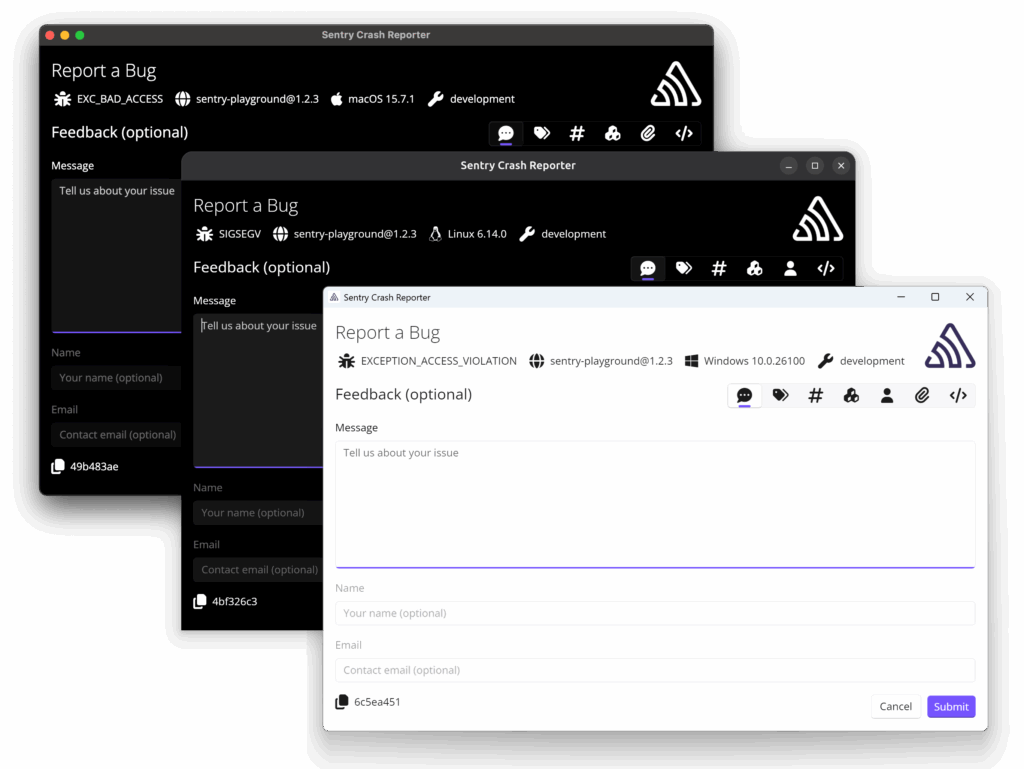
With Uno Platform, Sentry was able to build a true native .NET cross-platform app that runs seamlessly on Windows, macOS and Linux, all from a single shared codebase and unified UI rendering across platforms. While Uno Platform provides the core open-source stack, Uno Platform Studio brings all the tooling goodness, so developers can build cross-platform .NET apps with enterprise-grade AI and visual tools.
The Sentry Desktop Crash Reporter app serves some unique needs and enables full visibility as errors happen:
- Cross-Platform: Works on Windows, macOS, and Linux, thanks to .NET and Uno Platform.
- User Consent: Gives the user explicit control over whether their crash data is sent.
- User Feedback: Allows users to add comments to the crash report, about what they were doing when the crash occurred.
- Crash Information: Displays crash details from the attached memory dump.
- Attachments: Allows users to preview crash report attachments, such as screenshots.
- Debugging: During development, developers can see crash details immediately by sending them straight to a text editor of choice.
PS: If we have piqued your interest, come join us for a Uno Platform webinar on December 16, 2025. We’ll have Sentry join us to tell their Sentry Desktop Crash Reporter story, along with us unpacking a lot of Uno Platform AI tooling goodness to end the year on a high note!
Conclusion
Sentry has long pioneered error and performance monitoring software for developers, and they continue the journey with native desktop apps. The Sentry Desktop Crash Reporter is a cross-platform crash reporter that integrates with Sentry Native SDK and provides all the visibility to users/developers when crashes happen. The really nice story with Sentry Desktop Crash Reporter is that it is a true .NET cross platform app – running seamlessly on Windows, macOS and Linux, all from a single shared codebase with Uno Platform.
Developers: Don’t let coding issues and app crashes ruin your holiday spirit – let the Sentry Desktop Crash Reporter help. And if Sentry can pull off this complicated apps from a single .NET codebase with Uno Platform, so can you. Need more inspiration as to what you can build with Uno Platform? We have been having a lot of fun leveraging Uno Platform Hot Design AI Agent and MCP tools to come up with awesome .NET cross-platform UI – check out the 12 Days of Christmas apps with Uno Platform.
There is plenty of inspiration developers – anything fun you’re building this holiday season? Cheers.
Next Steps
Ready to boost your productivity and simplify cross-platform .NET development? Try Uno Platform today by downloading our extension for your preferred IDE and join our developer community.