Everyone’s hyped about the Ralph Wiggum technqiue for Claude Code.
Install it. Write a prompt. Let AI work autonomously for hours. Come back to a finished app. Sounds incredible.
Here’s what actually happens: You write a prompt. Ralph runs for 45 minutes. It declares victory. You check the output. Half the requirements are missing. iOS doesn’t compile. The “persistence” layer saves to memory that vanishes on restart.
What went wrong? Nothing, actually.
Ralph did exactly what you asked. The problem is what you asked for.
Why "Better Prompts" Doesn't Help
The standard advice is “write better prompts.” More detail. More specificity. That’s like saying “write better requirements” when your app has bugs. True, but useless.
Here’s the non-obvious part: Ralph Wiggum is a loop. It runs, checks your success criteria, and keeps going until all criteria pass. That’s it. That’s the whole trick.
Which means everything depends on the criteria. Vague criteria? Ralph satisfies them vaguely and stops. You asked for “app works on all platforms.” It ran on desktop once, saw no crash, declared success. Technically correct.
The skill isn’t “prompt engineering.” It’s criteria design. And there’s a much simpler way to think about it.
The Reframe: Constraints, Not Wishes
Forget what you want. Focus on what would block your PR.
You already know this list:
- Does it build on iOS?
- Does it build on Android?
- Do the analyzers pass?
- Are there warnings?
- Does the app actually launch?
These are constraints. Binary. Pass or fail. No interpretation required.
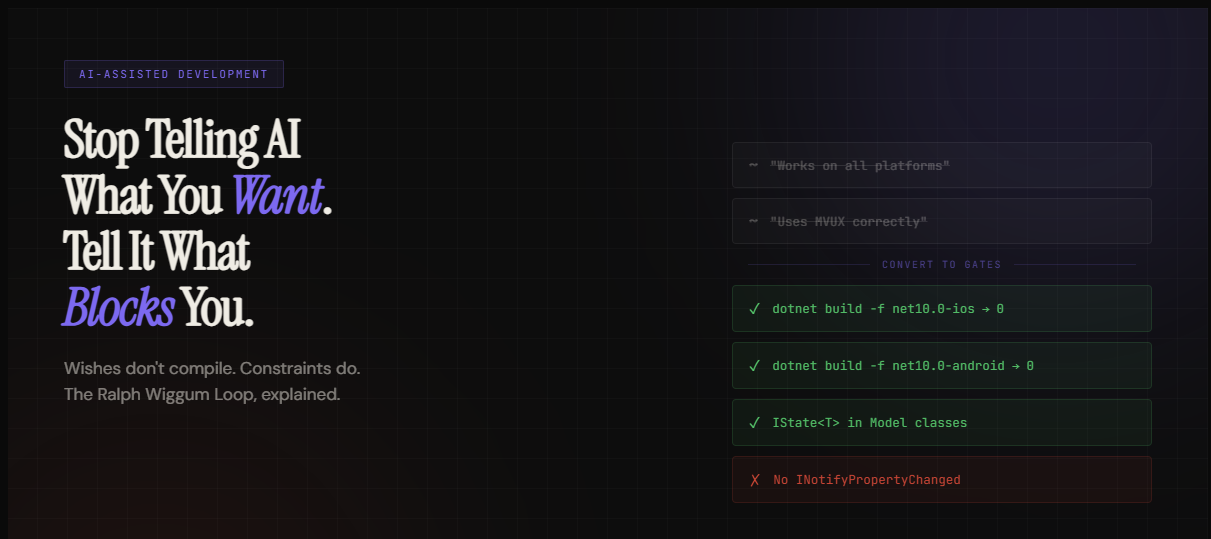
Ralph’s success criteria should be the same thing. Not “works correctly” but “`dotnet build -f net10.0-ios` exits 0.” Not “follows best practices” but “no classes implement INotifyPropertyChanged in the Models folder.”
This is the entire insight. Convert wishes into gates.
The Test: Can a Script Check It?
Here’s a simple filter. For each success criterion, ask: “Can a script verify this?”
If yes, it’s a constraint. If no, it’s a wish.
| Wish | Constraint |
|---|---|
| "Works on iOS" | dotnet build -f net10.0-ios exits 0 |
| "Uses MVUX correctly" | IState<T> found in Model classes |
| "Responsive design" | VisualStateManager defines states at 641px and 1008px |
| "Data persists" | File exists at specific path after app restart |
| "Good UX" | All touch targets MinHeight >= 44 |
Ralph can grep. Ralph can run build commands. Ralph can check file existence. Ralph cannot evaluate “good.”
Every wish becomes a gate. Every gate is binary. That’s the whole approach.
Three Examples That Actually Work
Let me show you weak criteria, what goes wrong, and how to fix them. All three are Uno Platform scenarios because that’s what I work with, but the pattern applies anywhere.
Create an Uno Platform app with TabBar navigation.
Implement user preferences with MVUX and persistence.
Dashboard that adapts from mobile to desktop.
The Constraint Stack
Here’s how I build success criteria now. Four layers, in order:
Stack these. Ralph checks all of them, every loop. If it doesn’t compile on all targets, nothing else matters.
Iteration Budget: A Real Tradeoff
The --max-iterations flag matters more than people realize.
Loose criteria with high iteration cap: Ralph loops forever trying to satisfy something unmeasurable. Burns your usage. Produces garbage. Tight criteria with reasonable cap: Ralph converges fast because exit conditions are clear. 30 iterations is usually enough for a well-specified task.
Tight criteria reduce iteration count, which reduces cost. Vague criteria do the opposite.
What This Doesn't Fix
Let me be direct about limitations.
Aesthetic judgments: “Looks good” requires eyes. Constrain structure, review visuals yourself.
Performance at scale: “Handles 10K items” or “loads in under 2 seconds” requires load testing. Ralph can build it. You benchmark it.
Security vulnerabilities: XSS, injection, exposure of secrets. Ralph doesn’t audit for these. Run your security tooling separately.
Business logic correctness: “Calculates tax correctly” or “handles edge cases” requires domain knowledge. Constrain the structure, verify the math yourself.
Integration complexity: External APIs, authentication flows, device-specific behavior. Ralph can scaffold. You verify.
The judgment problem: Some decisions are subjective. Ralph will make choices. You might disagree. That’s not a bug.
The pattern: constrain what you can (structure, types, patterns), review what you can’t (aesthetics, security, business logic).
Takeaway
Ralph Wiggum isn’t magic. It’s a loop with a termination condition. Your success criteria are that condition.
Vague criteria produce vague results. Binary constraints produce verifiable results. The skill is converting what you want into what can be checked
You already do this for CI pipelines. Do the same thing for Ralph.
Shoutout
Shout out to Geoffrey Hutley, the creator of Ralph and a former contributor to Uno Platform project a few years ago — thanks for building Ralph and pushing the space forward.