The Windows Community Toolkit (WCT) empowers millions of Windows experiences with its suite of Fluent UI controls. Starting with their 8.0 release, WCT controls can be leveraged by .NET developers using WinUI 3, WinUI 2, and Uno Platform. Uno Platform enables the WCT to reach beyond just Windows, including the web with WebAssembly.
WCT enables developers to focus on building great experiences by providing solid and proven building blocks: Settings, Sizer, and Layout controls, an Animation library, and more.
Uno Platform is the most flexible open-source platform for modern cross-platform .NET development, complete with enterprise-grade AI and visual design tools. Paired with Uno Platform Studio, .NET developers get a serious boost in productivity with Hot Design runtime visual designer, Hot Reload for the fastest C#/XAML dev loop, dependable AI Agents/MCP tools, and flexibility in technology stack; all towards building apps from any OS/IDE to run on mobile, web, desktop, or embedded devices.
Windows Community Toolkit Labs
Enter Toolkit Labs: a powerful web app to run the WCT Toolkit on the web.
The Windows Community Toolkit Labs is the WCT's incubation space for experimenting and creating new controls. By using Uno Platform, the team can showcase their gallery of stable and experimental controls easily within the browser through WebAssembly.
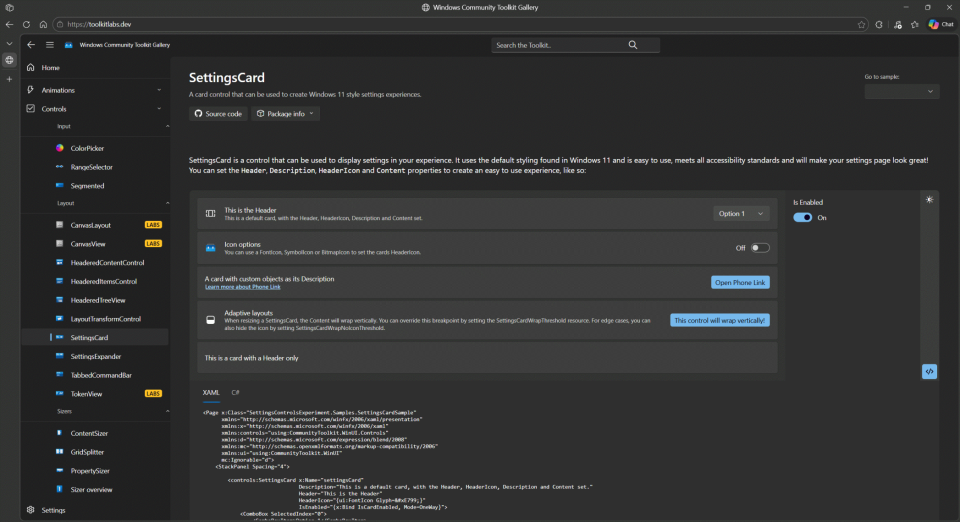
This enables developers to easily understand what the Windows Community Toolkit has to offer without needing any setup or tooling. Uno Platform enables this additional reach with minimal effort. The WCT team embodies the goal of write-once, run anywhere.
Windows Community Toolkit and WinUI 3
The Windows Community Toolkit has come a long way from its humble beginnings 10 years ago. As the WCT grew, the team needed to re-evaluate their processes, and once WinUI 3 came along, their codebase as well. Initially, when WinUI 3 first launched, they thought it would be a quick transition. A much longer road lay ahead.
Their initial approach was to create a separate branch of the toolkit for WinUI 3, intending it to become the main branch. A lot was happening at this time: the project was getting more usage across the ecosystem, larger projects with huge user bases (like the Microsoft Store) were depending on it, and they needed a place where they could try new things easily, collaborate, and get feedback without impacting stability. It was also getting difficult to work on the toolkit as a huge monolithic project with a single solution file.
Along with the rise of Uno Platform, the WCT team saw an opportunity to address a number of their challenges with their codebase and workflow at the same time, and not only increase their ability to maintain the project but reach a broader audience as well.
Open Source Library Challenges
After reaching their seventh major release and starting to support WinUI 3 in 2021, there were many pieces to consider in order to ship the high-quality components expected by consumers: docs, samples, and tests. Each of these had their own quirks and requirements.
For instance: docs lived in a whole separate repository, making coordinating changes difficult. Meanwhile, samples would pull those docs later and had their own special formatting. It made coordinating and working on changes that included docs and samples very hard to do as a contributor. Finally, tests were a bespoke process they had tried to adapt to align with the WinUI testing model.
They realized they needed a new way to work on the project. Since they needed to adapt how they maintained their codebase, they decided to rework everything from the ground up.
Starting Over
This was a hard two-year journey. But it has been worth it in the end, seeing how the team has been able to more easily collaborate with their community in the time since.
With an Uno Platform mindset, they did some initial experiments over a couple of months and realized they could build components that shared all their code for not only WinUI 2 and WinUI 3, but for Uno Platform as well. This gave the team the confidence to proceed and ensure a single codebase with the broadest reach.
The sample app was rebooted in a way that could serve both the end product of a nice gallery and the development process. Now that they knew they could maintain their codebase easily, the philosophy shifted to enabling maintaining the code and components just as easily and providing the best possible inner dev loop.
How could they make writing controls as easy as writing an application?
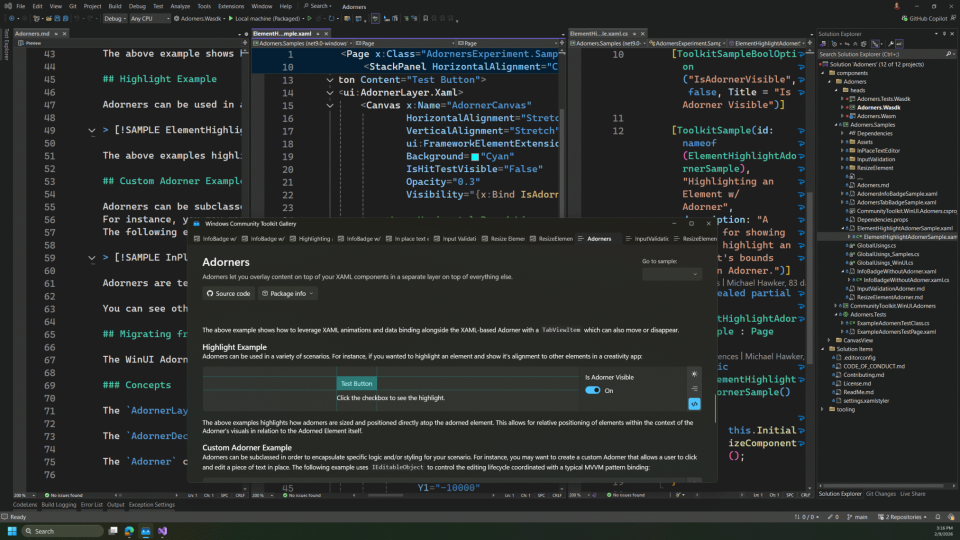
What the New Tooling Enables
- Scoped development: Work on a single package at a time for quick compilation
- Simple project structure: Each package solution consists of three projects for source, samples/docs, and tests
- Samples as XAML pages: Write samples as File → New XAML Page, with optional attributes for property toggles and selectors, all powered by compile-time Source Generators
- Embedded documentation: Write Markdown documents within the sample project with the ability to embed samples directly
- Fast dev loop: Run samples directly from source. Docs and samples are now part of development, required, and fun
- Cross-framework via Global Usings: Enable cross-framework development without developers needing extra
#ifdef - Tests on MSTest: Source Generator enables File → New XAML Page for UI test scenarios with access to UI elements
- Multi-platform samples: Run samples on Windows App SDK with WinUI 3, UWP with WinUI 2, and the web with Uno Platform WASM
- Codespace support via Uno Platform WASM
- Unified gallery: Correlate all samples/components, even across repos, into a single sample gallery
After proving this technology in WCT Labs with their latest controls, the team migrated their most widely used controls to the platform for the 8.0 release in 2023. They achieved keeping development of WinUI-based controls super simple and having everything else be "magic," though it has taken (and still takes) a lot of work behind the scenes.
A Whole New World
This new Windows Community Toolkit infrastructure allows the team to build, test, document, and collaborate easily with a dev loop akin to any WinUI app developer, while also creating a robust cross-framework, cross-platform library. It wouldn't have been possible without Uno Platform paving the way with their vision and pushing the boundaries of multi-platform .NET tooling.
"If you put your mind to it, you can accomplish anything." — Doc Brown
The WCT team hopes you've found this insight into the power of code and what's possible with .NET, the Windows Community Toolkit, and Uno Platform inspiring.
Share on social what you've built with these controls!