Microsoft’s Reactor brings declarative, XAML-free C# UI to WinUI – and Uno Platform 7.0 takes that same C# everywhere Uno Platform runs, right alongside your existing XAML/MVVM code.
Ask .NET developers how they build UI and you’ll get at least a few different answers – and every one of them is right.
That’s the beauty of the .NET ecosystem. It has never been a one-size-fits-all world. With Uno Platform 7.0, there’s one more way to build – and it runs on a variety of platforms & devices. Let’s unpack…
How do you .NET?
Here’s a frame that might help: think of coffee. Same beans, very different ways to brew them. ☕
The Keurig: XAML/C# and MVVM
The traditional approach is the Keurig. Everything has a slot, and everything has a job. The pod is your XAML – it describes the visual tree. The water reservoir is your ViewModel – it owns the state. And the button press is your bindings – they connect the two. Drop it in, press go, get a reliable cup every time.
<StackPanel>
    <TextBlock Text="{x:Bind ViewModel.Count, Mode=OneWay}" />
    <Button Content="+" Command="{x:Bind ViewModel.IncrementCommand}" />
</StackPanel>public partial class CounterViewModel : ObservableObject
{
[ObservableProperty] private int count;
[RelayCommand] private void Increment() => Count++;
}The reality is, this works. Like a Keurig, it’s predictable, and there’s a pod for everything: tooling, designer support, templating, data binding, years of samples and guidance, a deep well of third-party controls. For large codebases with many hands on deck, that separation of concerns is a feature, not a tax.
The Espresso machine: Declarative C# and MVU
Then there’s the espresso machine – fresh grounds, no pods. One motion: state goes in, UI comes out. You describe your visual tree as pure C# – a function of state – and the framework figures out what changed. This is the MVU (Model-View-Update) pattern, and it will feel instantly familiar if you’ve spent time with React, SwiftUI, or Jetpack Compose.
Choice is a good thing
What’s nice is, neither one is “the right way to .NET.” The best part of this ecosystem is that developers get to pick the approach that fits the team, the app, and honestly – the mood. Flexibility is a feature.
Microsoft.UI.Reactor
So where does Microsoft.UI.Reactor fit in?
What it is
Reactor is Microsoft’s declarative, component-based C# framework for WinUI 3 – an experimental project that landed on GitHub in April 2026. And here’s the important bit: it is not a new UI platform. It’s a new way to describe WinUI content. Every control Reactor renders is a real WinUI control – Button, TextBox, NavigationView – same beans, different brew.
Under the hood, Reactor keeps a virtual element tree, diffs old versus new, and patches only what changed on the real controls. State lives in hooks like UseState, right next to the render logic. Here’s the “hello world” counter from the Reactor repo:
class MyApp : Component
{
    public override Element Render()
    {
        var (count, setCount) = UseState(0);

        return VStack(
            Heading($"Count: {count}"),
            HStack(8,
                Button("-", () => setCount(count - 1)),
                Button("+", () => setCount(count + 1))
            )
        );
    }
}
No XAML, no ViewModels, no observability
Look at what’s missing. No App.xaml. No code-behind. No ViewModels. No INotifyPropertyChanged plumbing, no binding expressions to keep in sync. Just C# – with full IntelliSense, refactoring, and compile-time type safety. A binding that fails silently at runtime because of a typo in a string? Not a thing here.
Mix and match
Reactor doesn’t ask you to burn anything down. You can host Reactor content inside a XAML app, or drop XAML content inside a Reactor app – they share the same visual tree. XAML/C#/MVVM absolutely work and aren’t going anywhere – Reactor offers a refreshing alternative.
Only for WinUI, though
Reactor is built for WinUI 3 desktop apps. If you want that declarative C# model on the web, on a phone, or on a Mac – you’re out of luck.
Or are you?
Uno Platform Reactor support
Uno Platform 7.0 brings support for Microsoft.UI.Reactor. And that changes the story: the same C# you’d write for WinUI now runs everywhere Uno Platform runs.
Turning it on is one line in your project:
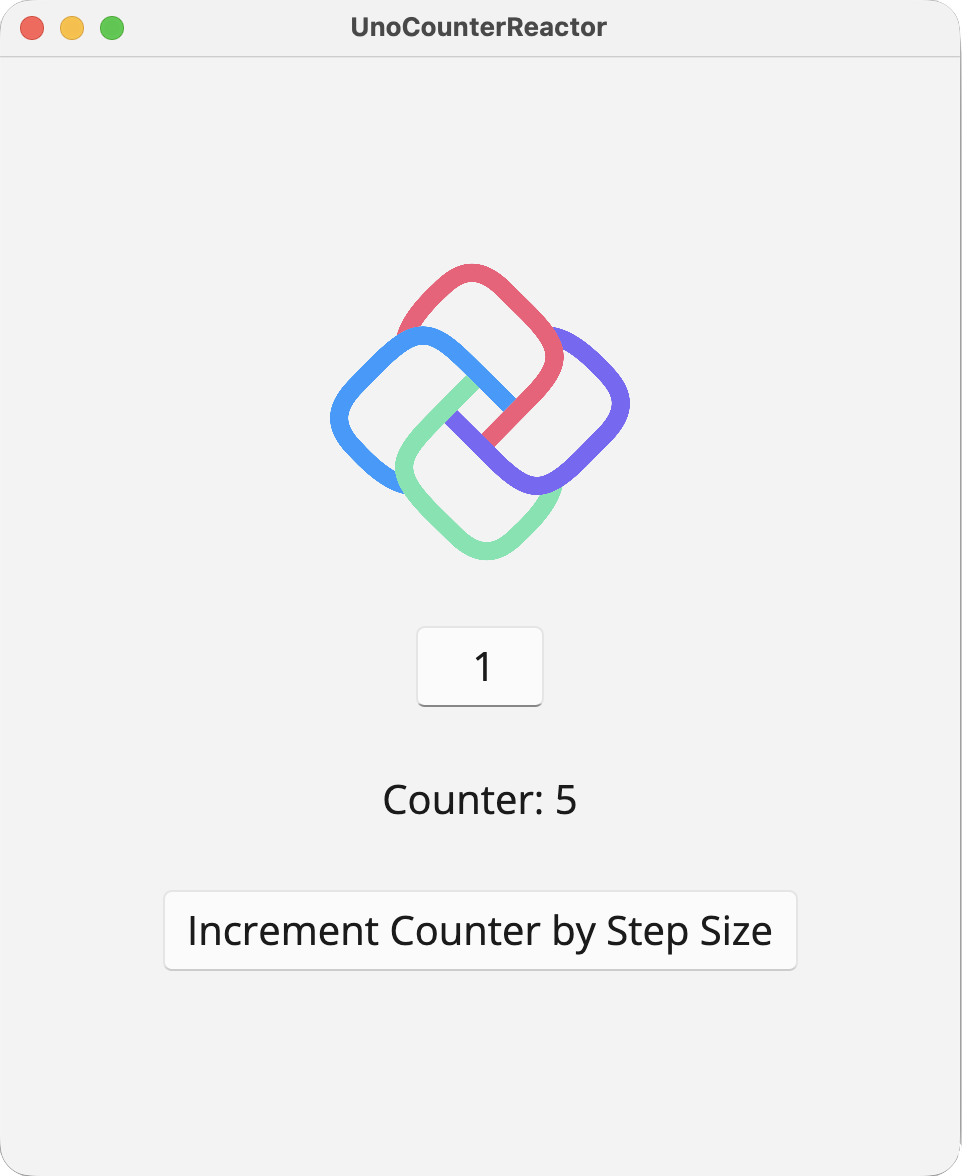
<UnoFeatures>Reactor</UnoFeatures>Here’s the Uno Platform Counter app, written with Reactor – no XAML, no ViewModel. State lives in hooks, and every state change re-runs Render() while Reactor patches only the WinUI controls that changed:
using Microsoft.UI.Reactor;
using Microsoft.UI.Reactor.Core;
using Microsoft.UI.Xaml;
using static Microsoft.UI.Reactor.Factories;

namespace UnoCounterReactor;

public class MainComponent : Component
{
    public override Element Render()
    {
        // Replaces MainViewModel.Count / MainViewModel.Step.
        var (count, setCount) = UseState(0);
        var (stepText, setStepText) = UseState("1");

        // The TextBox holds raw text; fall back to a step of 1 until it parses.
        var step = int.TryParse(stepText, out var parsed) ? parsed : 1;

        return VStack(
            Image("ms-appx:///Assets/logo.png")
                .Size(150, 150)
                .Margin(12)
                .HAlign(HorizontalAlignment.Center),

            TextBox(stepText, setStepText, placeholderText: "Step Size")
                .TextAlignment(TextAlignment.Center)
                .FontSize(20)
                .Margin(12)
                .HAlign(HorizontalAlignment.Center),

            TextBlock($"Counter: {count}")
                .TextAlignment(TextAlignment.Center)
                .FontSize(20)
                .Margin(12)
                .HAlign(HorizontalAlignment.Center),

            // Replaces IncrementCommand.
            Button("Increment Counter by Step Size", () => setCount(count + step))
                .FontSize(20)
                .Margin(12)
                .HAlign(HorizontalAlignment.Center)
        ).VAlign(VerticalAlignment.Center);
    }
}
That same UI now runs on:
- 🌐 Web – in the browser through WebAssembly
- 📱 Mobile – Android and iOS
- 🖥️ Desktops – Windows, macOS, and Linux
- 📺 TVs – Android TV and Apple TV
- 🚗 CarPlay and ⌚ wearables – the same Uno Platform reach, now with C# UI on top
Developers get the same Uno Platform UI, rendered through C#. Your existing XAML pages, styles, and view models stay exactly as they are – Reactor components render real WinUI controls in the same visual tree, just like they do on Windows. Mix and match works on every platform, too.
Why does this come together so cleanly? Because Uno Platform keeps a 1:1 API surface with WinUI, an automated sync can bring the latest changes from the Microsoft.UI.Reactor repository over with little effort. When Reactor moves, Uno Platform follows.
One honest note: both Reactor and Uno Platform’s support for it are new. Expect things to evolve. The Reactor guide covers single-file apps and the unoapp-reactor template – a good place to start.
What about MVUX?
If MVU is your thing, you may be wondering: doesn’t Uno Platform already do that? It does. Uno Platform has had MVUX for a while – it’s part of Uno Extensions, and it’s the more mature MVU option, built for XAML-based apps. Reactor takes a different route to a similar idea: pure C#, no XAML at all.
Two flavors of MVU, one platform. Pick your brew.
See it in action
Reading the concept & code only gets you so far. Let’s sit back and marvel at it running.
Wrapup
Let’s recap – XAML/C# with MVVM is here to stay. For big codebases with lots of contributors, it really works, and nobody should feel pressured to leave it.
But Reactor is an interesting experimental option. It’s nice for developers to have the flexibility to write pure C# when that’s how they think – and with Uno Platform 7.0, that C# Reactor pattern now goes everywhere Uno Platform goes.
Same beans. Your brew. Every platform.
We can’t wait to see what you build – cheers developers! ☕