Give your AI agent
eyes,
hands,
and Uno Platform expertise
Two MCP servers. One for deep platform knowledge — docs, APIs, best practices. One for runtime control — inspect and modify your live app’s visual tree.
Ground your agent in platform knowledge, then let it inspect, interact with, and improve the live app.
Knowledge Layer
MCP
Remote server exposing the full documentation — APIs, controls, migration guides, XAML patterns, C# Markup, and Uno Extensions.
Docs search — APIs, controls, theming
Migration — WPF, Xamarin, MAUI
Best practices — MVUX, navigation
Always current — no stale data
Runtime Layer
App MCP
Connect your agent to a live Uno app. Inspect the visual tree, modify properties, debug layout, and iterate without recompiling.
Visual tree — every element, every prop
Live modification — styles, layout, data
Pointer & keyboard interaction
Works with Hot Design
dotnet dnx -y uno.devserver --mcp-app
https://mcp.platform.uno/v1
Available Tools
What your agent can do
Specific MCP tools exposed by each server. Your agent discovers these automatically.
uno_platform_docs_search
Semantic search across all Uno Platform documentation, APIs, and guides.
uno_platform_docs_fetch
Retrieve full documentation pages with code examples and API signatures.
get_visual_tree
Query the live app’s visual tree — every element, type, name, and nesting level.
get_element_properties
Read any property on a live element — width, margin, color, data context.
set_element_property
Modify any property on a running element — no recompile needed.
interact_with_app
Simulate pointer clicks, keyboard input, and navigation on the running app.
Uno Platform
Building a new cross-platform app
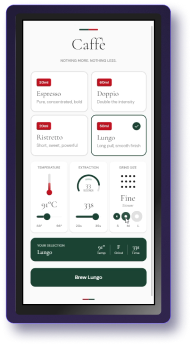
Your agent scaffolds pages, picks the right controls, and follows Uno Platform conventions — because it reads the docs in real time, not from stale training data.
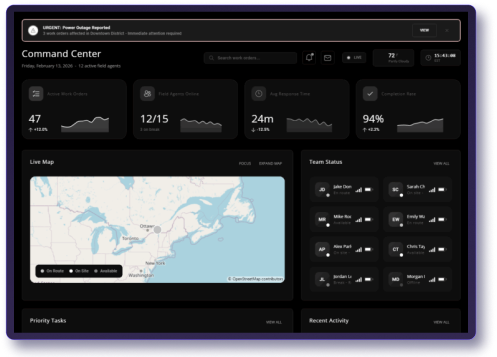
❯ “Create a responsive dashboard with NavigationView, use MVUX for state, and follow Uno best practices”
Migrating
Moving from WPF, Xamarin, or MAUI
The agent knows every migration guide. It flags breaking changes, suggests replacements, and rewrites XAML to work cross-platform — with citations to the docs.
❯ “Migrate this WPF UserControl to Uno Platform. Flag any API differences.”
Debugging
Fixing layout issues on a live app
App MCP lets your agent inspect the actual rendered visual tree, check margins and padding, and modify properties live — like browser DevTools for your Uno app.
❯ The card list has extra spacing. Inspect the StackPanel margins and fix them.”
Prototyping
Agent-driven UI design with Hot Design
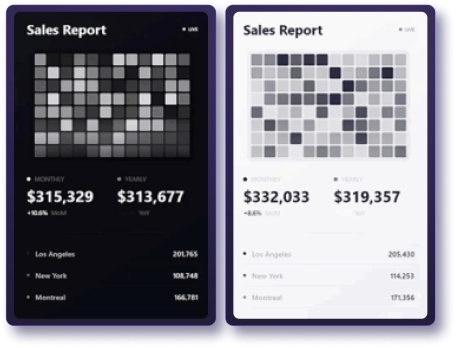
Combine App MCP with Hot Design and let your agent prototype UI changes on a running app. Describe what you want, see it instantly, iterate by talking.
❯ Change the header to use Material theme colors and increase the card border radius to 12″
30 Seconds to Setup
Copy. Paste. Build
One config file. Your agent instantly speaks Uno Platform.
This is remotely hosted and publicly available, and provides:
A set of tools to search and fetch Uno Platform documentation
A set of prompts to create and develop Uno Platform applications
App MCP
App MCP lets your agent inspect the actual rendered visual tree, check margins and padding, and modify properties live, like browser DevTools for your Uno app.
The Uno Platform MCP (docs server) is free and unlimited on both Community and Pro tiers. App MCP interactivity features are available on Community. Advanced App MCP context features require Studio Pro.
Any MCP-compatible client works. This includes Claude Code, VS Code (Copilot), Cursor, GitHub Copilot CLI, OpenAI Codex, Windsurf, and Google Antigravity. If your tool supports MCP, it works with Uno.
No. The remote Uno Platform MCP server only searches public Uno Platform documentation. It has no access to your codebase, project files, or app data. Your AI agent calls the server to look up docs — nothing more.
Hot Design is a visual designer that lets you edit UI on a running app by clicking. App MCP exposes the same runtime to AI agents programmatically. They complement each other — use Hot Design Agent to let AI drive the visual designer through MCP.
Yes. The Uno Platform MCP server is connected to the live documentation. When docs are updated, your agent gets the latest information immediately — no waiting for model retraining.
Ready to give your agent superpowers?
Free with Community. Pro features with Studio Pro.
We use cookies on our website to give you the most relevant experience by remembering your preferences and repeat visits. By clicking “Accept”, you consent to the use of ALL the cookies.
This website uses cookies to improve your experience while you navigate through the website. Out of these, the cookies that are categorized as necessary are stored on your browser as they are essential for the working of basic functionalities of the website. We also use third-party cookies that help us analyze and understand how you use this website. These cookies will be stored in your browser only with your consent. You also have the option to opt-out of these cookies. But opting out of some of these cookies may affect your browsing experience.
Necessary cookies are absolutely essential for the website to function properly. This category only includes cookies that ensures basic functionalities and security features of the website. These cookies do not store any personal information.
Any cookies that may not be particularly necessary for the website to function and is used specifically to collect user personal data via analytics, ads, other embedded contents are termed as non-necessary cookies. It is mandatory to procure user consent prior to running these cookies on your website.
Uno Platform 5.2 LIVE Webinar – Today at 3 PM EST – Watch