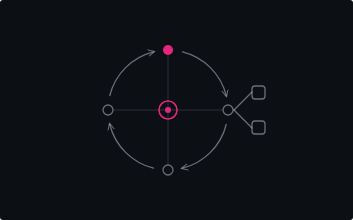
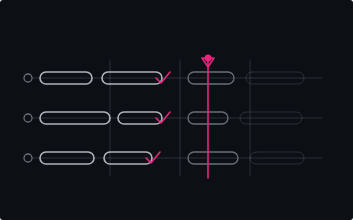
- An LLM has no memory between calls. Its working memory for a single request is one thing: the tokens in the context window.
- Attention is shared across that working memory, so the more you load into it, the less focus anything in it receives.
- Reliable behavior comes from managing working memory on purpose: keep what the task needs, clear what it does not.
A language model holds no state between calls. Everything it knows in a given moment is the text in front of it: the system prompt, the conversation so far, the files it has read, the output of its tools. That bundle of tokens, the context window, is the model's entire working memory for that request. There is no other store it can reach.
The obvious lever looks like size. Most models I reach for now offer a million tokens of working memory, and the pitch is to stop curating and let the agent keep everything. I ran agents that way for a while. Reliability broke down when the answer had to be worked out instead of looked up. The teams who tested this carefully found the same pattern: once you remove the literal word overlap that lets a model shortcut "find the needle," accuracy that was near-perfect on short inputs falls toward a coin flip well inside the advertised window.
So the million-token number describes how much working memory the agent will accept, not how much it can hold in focus at once. Those are different quantities, and reliability depends on the second one (see Fig. 1).
The large window still earns its place. It absorbs long histories, keeps a multi-step task from hitting a hard cutoff, and leaves room for tools. It also removes the forcing function: nothing stops you from filling it, so the agent will carry three hundred thousand tokens of accumulated context and keep going right up until its answers quietly degrade. Keeping an agent reliable means keeping its working memory clean, and that starts with knowing what the working memory is made of.
What the working memory is made of
Working memory is counted in tokens, the small pieces text is split into, each one roughly three-quarters of a word. A four-thousand-token request is a few pages; a hundred-and-fifty-thousand-token request is a small book.
o200k, the tokenizer behind GPT-4o, the o-series, and GPT-5, shown as they split inside this sentence. Common words stay whole; one identifier, INotifyPropertyChanged, becomes four tokens. Other models differ: GPT-4 splits it into three, and Claude uses its own tokenizer that Anthropic does not publish, so counts shift model to model. Treat the pattern as the lesson and expect the exact pieces to vary. Your working memory is counted in tokens, not words.What turns those tokens into behavior is attention. For each token it generates, the model weighs every token already in the working memory and decides how much each one should shape what comes next. Two facts about that process drive everything else.
The working memory is finite. Past the token limit, the tooling around the model drops or summarizes something to make room; nothing waits outside. The limit is the smaller issue. A fact sitting in the middle of a long working memory loses reliability well before you reach the edge of it.
Attention is shared. It is divided across everything present, so adding tokens lowers the focus on each one (see Fig. 2). A sentence in a four-thousand-token request holds far more of the model's attention than the same sentence inside a hundred and fifty thousand. The words are identical; the attention they command is not.
You choose what goes in
If the context window is the agent's working memory, then writing a prompt is deciding what it gets to think with. A weak answer is often a working-memory problem before it is a reasoning problem: the fact that mattered was missing, buried, or outnumbered.
That changes a few defaults. Loading an entire codebase or a long document feels thorough, and it lowers the quality of the answer, because the part you care about now competes with thousands of tokens that have nothing to do with the task. Handing the agent the three files that matter beats handing it thirty.
It also explains the long-session drift from the first section. As an agent runs, tool output and earlier steps accumulate in its working memory. The instructions you gave at the start are still in there, outnumbered, and the agent begins acting on whatever is most recent. The repair is to keep the working memory current: summarize and clear as you go.
A binding bug, two working memories
Say a binding in an Uno Platform view stops updating, and you bring an AI assistant to it. Same model, same question. The only thing that differs is what fills its working memory (see Fig. 3).
You paste the whole 2,000-line view, three viewmodels, and the full build log, then ask why the binding will not update. The line that matters, a setter that never raises a change notification, is a thin signal among thousands of unrelated tokens. The model searches for it and answers in generalities.
You paste the bound property, its setter, the one XAML element, and the eight log lines around the error. The working memory is almost all signal, the relevant tokens hold the model's attention, and the answer names the cause: the setter never raises the change notification, so the binding never hears the update.
Here is the same bug as the text you would actually send.
why isn't my binding updating? here's the page, the
viewmodels and the build output

[MainPage.xaml — 2,000 lines]
[MainViewModel.cs, SettingsViewModel.cs, DataService.cs]
[full build log]
A TextBlock bound to Temperature shows the initial value
but never updates after it changes.

Stack: Uno Platform, .NET 10, MVVM with CommunityToolkit.Mvvm.

XAML:
  <TextBlock Text="{Binding Temperature}" />

ViewModel:
  private double _temperature;
  public double Temperature
  {
      get => _temperature;
      set => _temperature = value;   // updated from SetTemperature()
  }

Symptom: SetTemperature() changes the field, the UI never repaints.

What's the most likely cause, and the smallest fix?
Both describe one bug. The curated version spends its tokens on the binding, the property, and the suspect setter, so the model names the cause, the setter never raises a change notification, on the first pass instead of digging for it.
Curating by hand works. You can also let tooling fill the working memory for you, which is the point of the App MCP in Uno Platform Studio.
Skip the copy-paste. The App MCP connects to your running app and hands the agent the live visual tree and the control's real properties and binding values, so it reads the true runtime state instead of guessing from pasted source, then verifies its own fix against the running app. The curation happens for you.
Working memory fills as it runs
Watch a real session and you can see the working memory fill whether you manage it or not (see Fig. 4). A fresh call is mostly headroom: a short system prompt, your instructions, the one file in question, your request. That file is a large share of the few thousand tokens present, so it holds strong attention.
Then the run continues. Every file read, every build log, every test result is appended. Forty turns later the same working memory holds well over a hundred thousand tokens: a long history, stacks of tool output, your original instructions far below where the model is writing, and the file you care about reduced to a sliver. Nothing was deleted. It was outnumbered.
This is the drift from the first section, seen from the inside. The window did not shrink; the useful fraction of it did. The repair follows from the picture: summarize the history, drop tool output you are done with, and keep the current task and the relevant file near the end of the window, where the model is actively writing and attention is strongest. The teams running long agents have names for these moves, compaction, external notes, and handing a slice to a fresh sub-agent, and they share one aim: keep the working memory mostly signal.
One thing to try this week
Here is the move that builds the instinct fastest. Open the longest-running AI chat or agent session you have going right now, and find the one constraint that has to hold for its work to be correct: the target framework, the API it must not touch, the rule you keep retyping. Move that line into the place that gets re-sent on every turn, the system prompt or a project rules file, so it stays in working memory instead of sinking out of it.
That is the whole exercise. One constraint, relocated from the fragile tail of a conversation into context that is always present. Do it once and you start to feel the difference between an agent that holds its instructions and one that loses them.
For the next bug, skip the pasting. Point the agent at the running app through the App MCP and let it read the real state. This is the prompt I reuse when a binding misbehaves.
A TextBlock bound to Temperature never updates on screen.

Stack: Uno Platform, .NET 10, MVVM with CommunityToolkit.Mvvm.

Use the App MCP against the running app:
  1. Snapshot the visual tree and find the TextBlock bound to Temperature.
  2. Read its live binding value and the source property on the view model.
  3. Change the value and check whether the binding updates.

Tell me where the chain breaks, and the smallest fix.