Previews brings Storybook-style, state-aware UI development directly into Hot Design — build, check, and fix any .NET page or control in every state it can be in, all in one place.
If you've spent any time building UI-heavy apps, you know the drill. You tweak a component, then spend the next two minutes navigating five screens deep in your running app just to see if it actually worked. Multiply that by every state that component can be in — populated, empty, loading, error — and 'quick UI change' turns into 'quick UI change plus ten minutes of app archaeology.'
We built Previews in Uno Platform Studio to kill that loop entirely.
PS: Want a deep dive into Previews? Read Hot Design Previews Demystified first.
Previews is a new capability in Hot Design that lets you open any page, control, UserControl, DataTemplate, or styled variant on its own — in exactly the theme, form factor or data state you want to look at.
Let's unpack broadly what Previews are, and why it should feel instantly familiar if you've worked in any other major UI ecosystem.
What a Preview actually is
A Preview is not a mockup, a screenshot, or some parallel design-time-only artifact. It's a real file in your project.
Each Preview is a two-file unit — a XAML file whose root is <hd:Preview>, paired with a code-behind decorated with [Preview]. It wraps whatever you're working on:
- A page, rendered at your app's current form factor
- A control, UserControl, or DataTemplate, rendered at its natural size
- A specific style variant, when you need to check a named style rather than the default
Because it's XAML and C# sitting in your project, it travels with your code. It shows up in your diffs. It lives in source control like everything else you write — no separate tool-specific format, no export step.
Want to feed it mock data instead of wiring up a real service call? Override LoadDataContext():
[Preview("With Mock Data", typeof(SearchPage))]
public sealed partial class SearchPageMockPreview : Preview
{
    public SearchPageMockPreview() => this.InitializeComponent();

    protected override object? LoadDataContext()
        => new SearchPageViewModel
        {
            Results = ["Result A", "Result B", "Result C"],
        };
}
That's it. No throttled network calls, no forcing a service to fail on demand, no repeating the same ten clicks to get back to the state you were just debugging. Define it once, and it's a permanent, one-click entry in your Previews tree from then on.
The big time saver is: you don't have to write any of this to get started. Any public, non-abstract type with a parameterless constructor gets an automatic Implicit Preview the moment it exists in your project. Build a new UserControl, and it's already sitting in the tree, previewable, before you've written a single line of preview code. Author an explicit preview for that type later, and the automatic one quietly steps aside.
Seeing all the app's pages together as Previews is also a great way to catch styling inconsistencies — developers get to visualize all pages side by side to adjust layouts as needed.
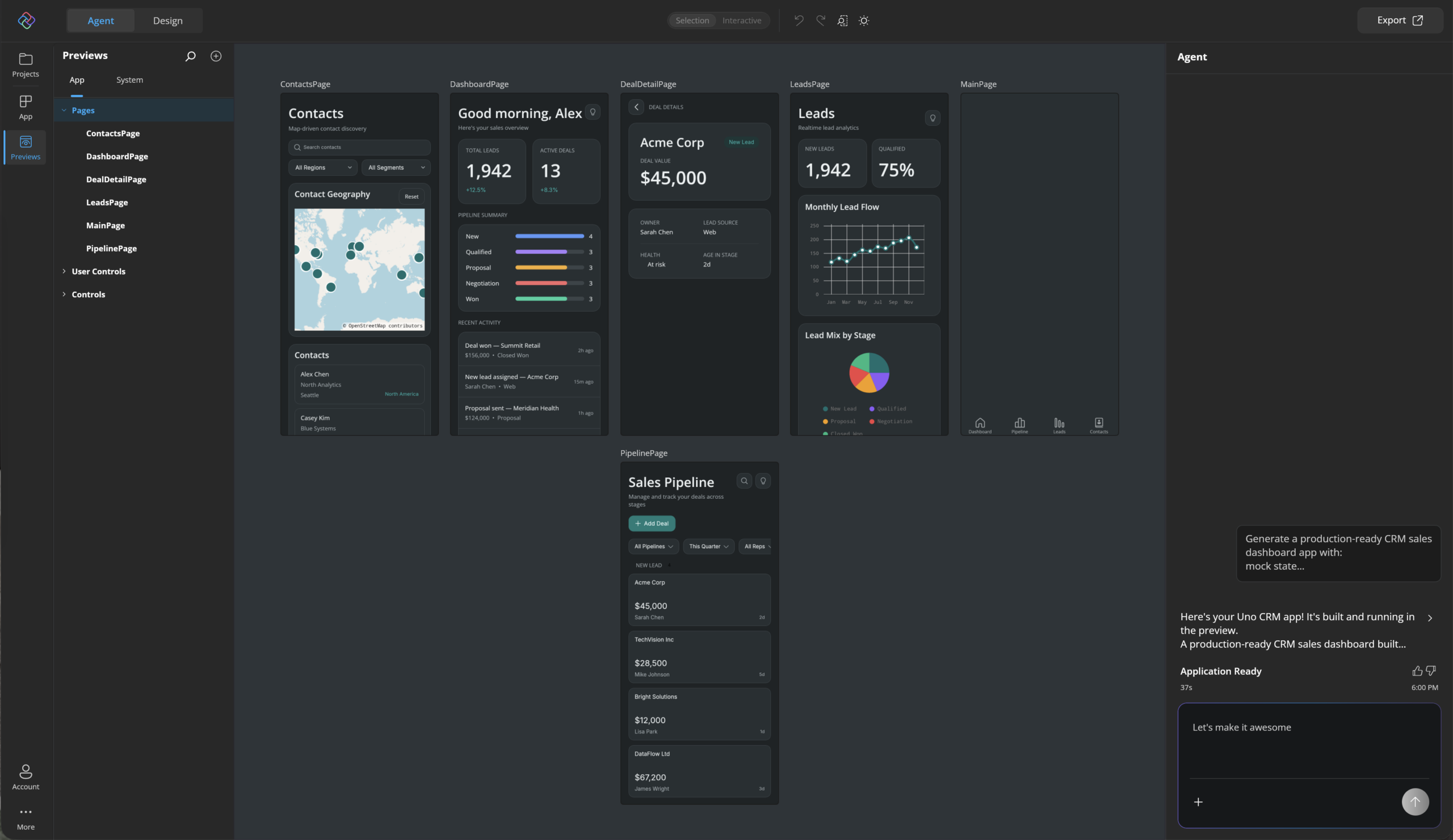
Previews view: In Uno Platform Studio, pages that make up the app are listed as implicit Previews.
One page, every state, side by side
So, what's the big benefit of Previews? When used right, Previews stop being 'a nicer way to open a component' and start being 'a genuinely different way to build.'
Some UI states are trivial to reach. Others take real effort — a search page might need populated, empty, loading, and error states, and reproducing each one by hand in the running app usually means faking data, killing your connection, or forcing a service call to fail. None of that is fun, and none of it is fast.
With Previews, you define each state once, as its own preview, and they sit permanently in your tree as separate, switchable entries. No re-triggering the conditions behind them. No "wait, how did I get the error state to show up last time?" You built it once — it's just there now.
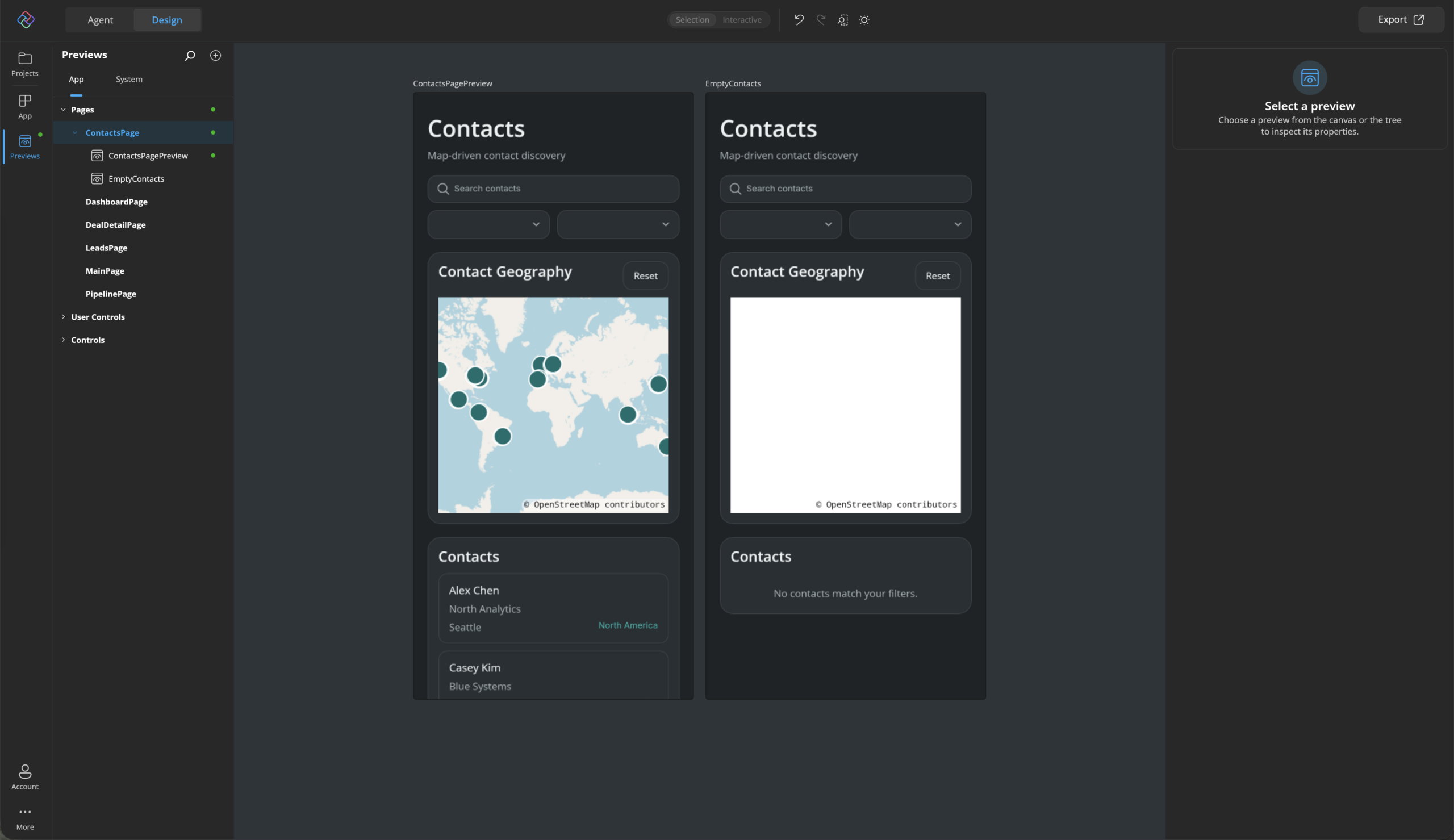
Previews show the same app page rendered across multiple states side by side.
That side-by-side view is, frankly, the single best argument for Previews. Bugs that only show up in the empty state, spacing that only breaks when a loading spinner is present, text that overflows only with long content — you catch these in seconds instead of after they've already shipped.
Familiar territory, if you've worked outside .NET
Let's be honest though — this pattern isn't new, and we're not pretending it is. If you've worked in the JS/component world, or shipped a native iOS app, you've almost certainly used something built on the exact same idea. Previews is Uno Platform bringing that idea home to XAML and .NET.
Storybook, the tool most JS/React/Vue developers know, exists to let you build and review a UI component in isolation, away from the page that hosts it — different states, different data, different props, all without booting the full app. That's the whole point. Swap 'component' for 'control or page' and 'props/args' for 'data context' and you're describing Previews almost word for word. Both treat isolated, state-aware UI development as a first-class workflow instead of an afterthought bolted onto your app's normal navigation.
SwiftUI Previews is the other close cousin, and arguably the more direct inspiration for how ours feels day to day. Apple's #Preview macro renders your SwiftUI view live inside Xcode's canvas, right next to your code, updating as you type — and just like Previews, you can declare multiple preview variants for the same view to check different states, devices, or data inputs side by side. If you've ever appreciated how SwiftUI Previews shortens the code-to-canvas loop, that's precisely the experience we set out to bring to Hot Design.
Jetpack Compose Previews rounds out the set, and it's the closest sibling of all in spirit. The @Preview annotation renders a Composable function directly in Android Studio, no emulator or device required, and — just like SwiftUI Previews and Previews itself — you can stack multiple annotated previews on the same Composable to check different states, screen sizes, or themes side by side. If you've built Android UI with Compose, the "annotate it, see it instantly" loop should feel like exactly what we're describing here.
What ties all four together isn't just 'render one thing on its own' — it's the philosophy underneath it: your UI should be checkable in every state it can be in, without your whole app standing in the way. Storybook paved the path for the web. SwiftUI Previews delivered for native iOS. Jetpack Compose Previews showed it for native Android. Previews is that same proof, now for cross-platform .NET.
We didn't invent this idea. We just think .NET and XAML developers have gone without it for long enough.
Try it
Previews is live in Hot Design today. Open a page or control you've been meaning to clean up, let the automatic Default preview show you what you're working with, and see how fast 'I need to check the empty state' turns into a single click instead of a five-minute detour. For many of the Gallery apps in Uno Platform Studio web, we've pre-populated ViewModels for various page states - you can easily add mock data to light up Preview experience for any app page/control.
PS: Want to see Previews in action? We covered Previews in detail during a recent Uno Platform Studio webinar.
Previews are here for cross-platform .NET - visualize app pages across various states. Time for you to give it a spin. Cheers, developers.