We're pleased to announce the next release of Uno Platform Studio, with new ways to develop and review UI, give AI agents more precise context, and build from a cleaner starting point.
This release adds four capabilities:
- 01Hot Design PreviewsWork with pages and components in isolation, using the data and application state you want to test.
- 02Hot Design SnippetsReusable XAML building blocks you can drop directly onto the canvas and customize in Hot Design.
- 03Select-and-PromptSelect an element on the canvas and prompt against that specific UI, giving the agent precise context for the change.
- 04Simple ThemeThe new default design system for Uno Platform applications, based on Figma's Simple Design System.
Previews and Snippets are available as part of Uno Platform Studio Business, our new SKU for teams that need more advanced UI development workflows. Studio Business also includes a larger pool of AI credits.
To celebrate today's announcement, take 25% off at checkout with UNO25M for monthly or UNO25A for annual.
Preview pages and controls across every state
Storybook, for cross-platform .NET.
Hot Design Previews lets you work with individual pages and components in isolation, using the data and application state you want to build, validate, and test. If you are familiar with Storybook, Previews are the same concept, just for cross-platform .NET application development.
Open any screen directly, then edit the real UI
Previews give you a direct path to UI that would otherwise take several steps to reach. If a page sits five screens deep in the app, you can open its Preview and keep working without navigating back to it after every change. This gives you an experience very similar to the one provided by traditional visual designers.
Because Previews render the same pages and components used by your application, you are not working on a design-time copy. Edits made from a Preview are reflected wherever that UI is used.
Reproduce the states you need
Some UI states are easy to reach. Others take work. A search page, for example, might need populated, empty, loading, and error states. Reproducing each one in the running app can mean changing data, throttling a connection, failing a service, or repeatedly stepping through the same workflow.
With Previews, you define those states once and keep them available as separate views, so you can switch between them without recreating the conditions behind each one. Each preview gets its data either from your component's real data context (handy when a view model already exists) or from mock values declared right in XAML (faster when you just need to fake a state), so the designer renders exactly what would ship at runtime.
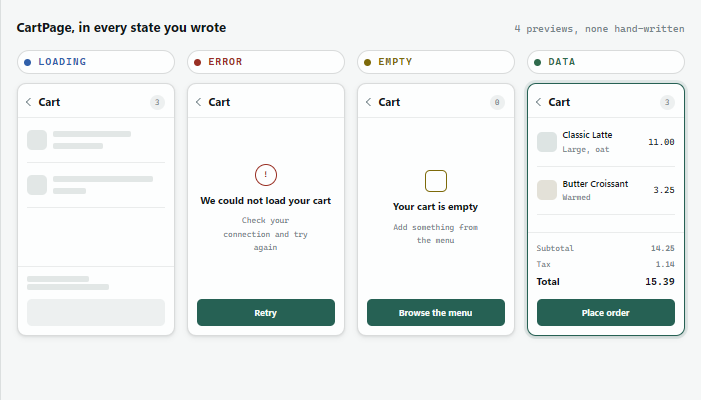
A faster, repeatable way to develop and review UI, with state-aware workflows that work for both developers and agents.
Read the official docs for Previews. The best way to experience them is to open a sample app in Uno Platform Studio on Web or follow the documentation to create your first Preview.
Reuse ready-made UI blocks
Snippets are ready-made XAML building blocks you drag onto the Hot Design canvas and customize in place. At your disposal are components, navigation, sections, cards, and full-page layouts, all producing clean XAML that works with MVUX and MVVM.
Login forms, search bars, chip rows, tab bars, navigation drawers, and product cards are solved problems. Asking an agent to produce one again spends time and tokens on a pattern that already has a good answer, and returns something slightly different each time. Snippets give that answer directly, and every one of them is editable XAML in your project the moment you drag it onto the canvas.
The catalog covers five categories:
| Category | What it holds |
|---|---|
| Components | Buttons, forms, search fields, chips, and lists for common interactions |
| Navigation | Menus, tabs, navigation bars, and drawers wired for app flow |
| Sections | Headers, footers, side panels, and content blocks that give a screen structure |
| Cards | Grouped-information layouts for feeds, dashboards, and detail views |
| Page Layouts | Full-screen responsive templates for common app screens |
The layouts are responsive by default and adopt your existing architecture when they land. The practical effect on an AI-assisted workflow is a clearer split: generation handles what is specific to your application, and proven blocks handle what is common to every application.
Point at the UI, describe the change
Select-and-Prompt lets you select elements in the running application and send them to an agent as context.
The prompt that used to read "in the settings page, the card at the top with the avatar and the two buttons, make the spacing tighter" becomes a selection and four words: "make the spacing tighter." The agent receives the element itself, inspects the surrounding visual tree, and expands outward only as far as it needs to go to find the code that controls the behavior you described.
Three benefits follow:
- Prompts get shorter, because location no longer has to be described at length.
- Unintended changes get rarer, because the agent starts from a precise element and expands only as needed.
- Credit consumption drops, because a grounded request needs fewer iterations to land.
The loop is short: select the element, describe the result, and the agent locates and modifies the implementation.
A shared design language for developers and agents
Simple Theme is Uno Platform's new default design system, based on Figma's Simple Design System (SDS). It gives applications a deliberately neutral starting point that is easy to shape into something of your own.
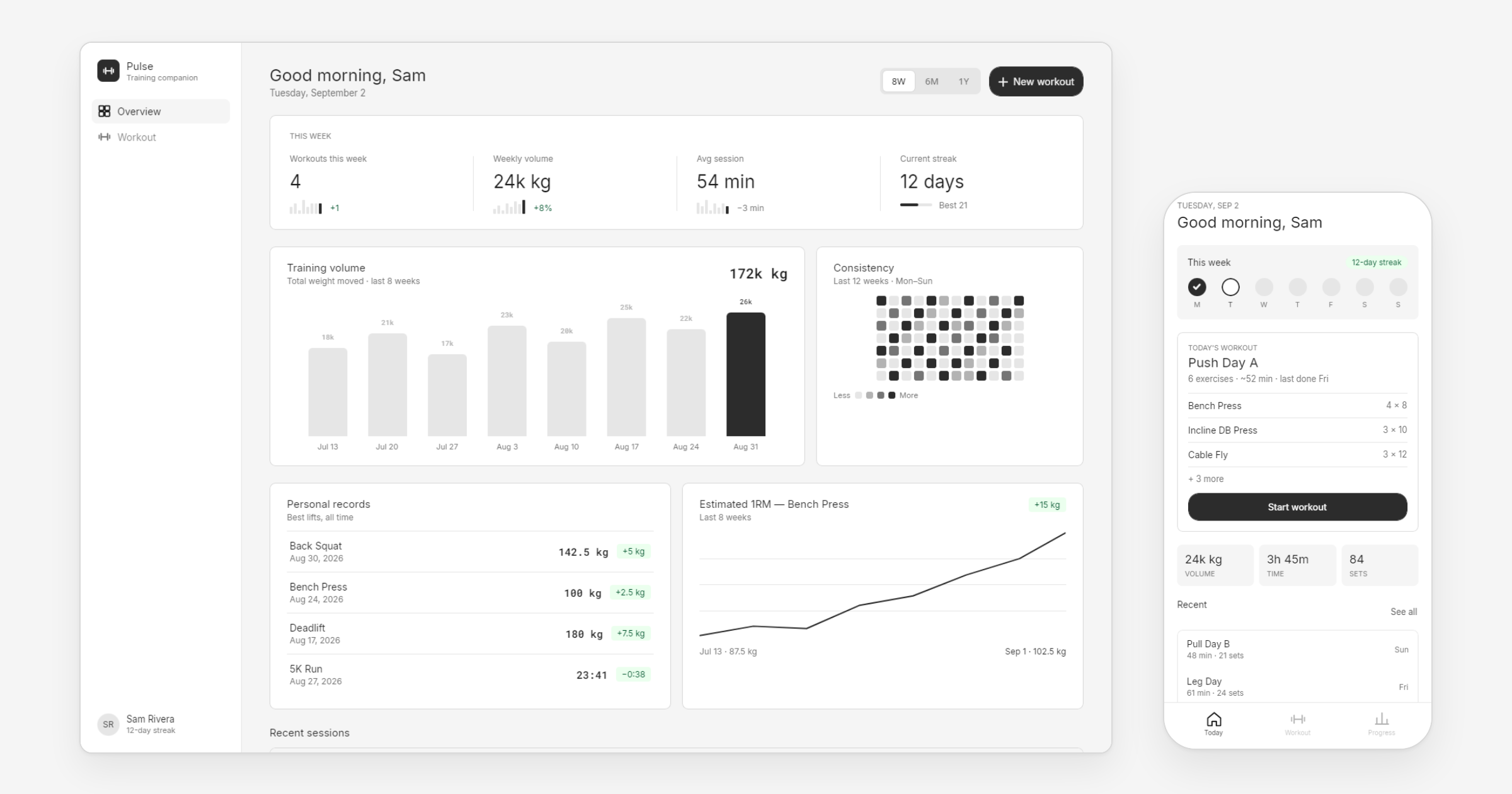
With Simple Theme you start with a foundation for color, spacing, density, shape, and common controls. From there you can establish your application's identity, while Material and Fluent remain available when you want to start from a more opinionated design system.
Simple Theme gives developers and agents a shared design language to build within, while leaving the final visual identity up to the developer. See the Simple Theme docs to get started.
Closing the loop
Generated UI is rarely exactly right, and fixing it by hand (hunting through XAML, guessing which property changed) breaks the loop between what you asked for and what you got.
Hot Design closes that gap. It's the only visual designer for cross-platform .NET applications, and it's more than a design surface: it's how developers and AI stay in sync. Once you have an initial result, you choose how to refine it, in code, visually, or with AI, and Hot Design keeps every version in sync.
- Simple Theme sets the design constraints.
- Snippets supply the code blocks that don't need generating.
- Select-and-Prompt points the agent at the right place.
- Previews visualize every page and component that matters.
AI carries the generation work and follow-up instructions when you need it to. Code, visual editing, and deterministic tools take over wherever they're the better tool for the job. The choice is yours. Uno Platform Studio brings you and AI together to help you ship with confidence and deliver high-quality applications.
A new tier for advanced UI workflows
Previews and Snippets ship in the new Business tier of Uno Platform Studio, which also includes 200 AI credits. Full pricing is on the subscription page.
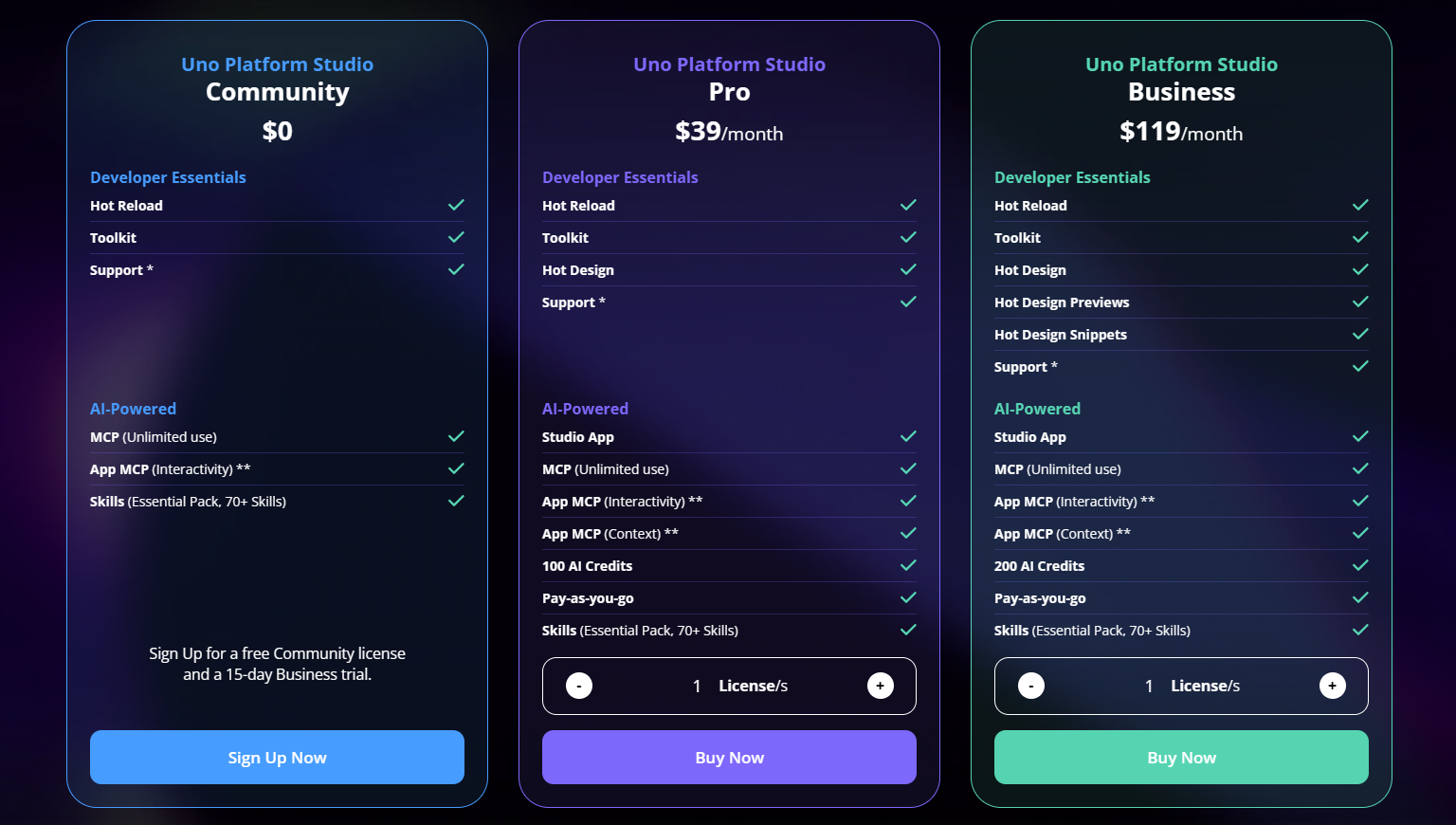
Available at checkout for a limited time: UNO25M for monthly, UNO25A for annual.
Uno Platform itself remains open source and free under the Apache 2.0 license.
Join us live
Experience what true AI-assisted development feels like. With Uno Platform Studio and these newly released features, .NET developers finally have the full set of intelligent tools to design, build, and ship faster than ever, all while retaining full control of their code.
The engineers who built each feature will demo it running, take questions in real time, and show you exactly how it fits into your day-to-day workflow. Bring your questions, bring your projects. We built these features for you, and we want to show you what they can do.
Try Uno Platform Studio now
The best applications result from a development workflow built around the human and the agent: giving them the right context, providing purpose-built capabilities, helping both developers and agents verify what was produced, and ultimately allowing developers to choose the most appropriate tool for each task.
Start building, right from your browser. Prompt your own app idea or continue building one of the starter applications we've already started for you. No setup required.