wpf → uno platform
Your C# and XAML skills transfer directly. WPF and WinUI share the same lineage — the dialect differs, but your architecture instincts carry over. Migrate screen by screen. Keep shipping your WPF app while you do.
In production at Toyota, Kahua, TradeZero, NuGet Explorer — enterprise WPF codebases migrated and shipping cross-platform.
I'm a developer exploring migration
See how your XAML transfers, follow a step-by-step tutorial, and migrate your first screen with AI agents.
→ Migration path + tutorial
I'm evaluating Uno Platform for my team
Review the architecture comparison, see the XAML equivalence table, and assess the effort for your application.
→ Comparison + reference tables
I'm researching modernization options
Understand the WPF modernization landscape, see the business case, and compare your options side by side.
→ Business case + comparison
why migrate
WPF isn’t going anywhere — but your users are. They’re on phones, tablets, browsers, and Macs. Your line-of-business applications need to follow them without doubling your engineering headcount.
Expand platform reach
Deploy to Web (WebAssembly), iOS, Android, macOS, and Linux alongside Windows — from the same project. Field teams get mobile access to LoB tools. Clients get browser-based dashboards. IT gets one codebase to maintain.
Modernize the stack
Move from WPF XAML to WinUI XAML — Microsoft’s forward investment. Gain Material Design 3 and Fluent theming,
MVUX for reactive state management, and Uno Extensions for navigation, dependency injection, and HTTP. Your architecture gets a generation upgrade.
AI-assisted migration
AI agents translate WPF XAML to WinUI XAML while MCP servers verify output against your running app. Not a black- box rewrite — a structured, auditable workflow where you approve every change.
Reduces manual conversion effort by 60– 80% on typical screens.
why now
AI-assisted migration is available now
AI agents handle ~80% of mechanical migration work — namespace swaps, event renames, binding
translations. This capability didn’t exist 18 months ago. The tooling window is open, but AI
migration workflows are evolving fast. The teams that move now build institutional knowledge while
the tooling is most accessible.
The WPF talent equation is shifting
Senior WPF developers are retiring or moving to cross-platform roles. Entry-level developers are
trained on web and mobile — not desktop XAML. Every year you wait, the pool of developers who can
maintain your WPF app shrinks, while the pool who can build cross-platform with Uno Platform grows.
.NET 10 creates a natural transition point
.NET 10 ships in November 2026. Major framework upgrades are the natural time to modernize — your
team is already planning for the disruption. Incorporating platform migration into the .NET 10
upgrade is dramatically more efficient than doing them separately.
The economics of WPF modernization have changed. The question isn’t whether to modernize — it’s whether to
modernize now, while AI tooling is available and the .NET 10 transition creates a natural window, or later, when
the cost is higher and the pressure is greater.
the migration path
Enterprise applications can’t afford a big-bang migration. Uno Platform supports incremental adoption — migrate one module at a time while your WPF app continues shipping to production.
Expand platform reach
Deploy to Web (WebAssembly), iOS, Android, macOS, and Linux alongside Windows — from the same project. Field teams get mobile access to LoB tools. Clients get browser-based dashboards. IT gets one codebase to maintain.
reference guide · effort estimation
Migrate a pilot screen with AI
Choose a representative screen — a data grid, a form, a dashboard panel. Run it through an AI agent configured with the Uno MCP server. The agent translates WPF XAML to WinUI, and the MCP verifies the output against your live app’s visual tree. Approve each change, validate the result.
hands-on tutorial · ~30 min
Modernize architecture with MVUX
Once UI screens port cleanly, upgrade your architecture layer. Replace MVVM + Prism patterns with MVUX — immutable models, reactive feeds, declarative state. Or keep MVVM if your team prefers. Uno Platform supports both; the choice is yours, not the framework’s.
architecture guide · mvvm or mvux
Go incremental with Uno Islands
Can’t migrate the full application yet? Embed Uno Platform controls directly inside your existing WPF shell. Ship new features as cross-platform Uno modules while legacy screens remain in WPF. Migrate at the pace your release schedule allows.
incremental adoption · embed in existing wpf
Before and after
Your team’s C# and XAML skills carry over. The XAML dialect shifts from WPF to WinUI — most markup transfers with targeted adjustments, not a rewrite. Business logic, data access, and service layers remain untouched.
WPF — current state
Windows only
Platforms
Windows Desktop
XAML dialect
WPF XAML
Theming
Custom / Windows chrome
Architecture
MVVM + Prism / custom
AI tooling
—
Web access
—
Mobile
—
Business logic
C# / .NET
Uno Platform — target state
7 platforms
Platforms
Windows · Web · iOS · Android · macOS · Linux · Embedded
XAML dialect
WinUI XAML (Microsoft’s forward path)
Theming
Material Design 3 · Fluent · Custom
Architecture
MVVM (your existing) or MVUX
AI tooling
MCP servers + agent workflow
Web access
WebAssembly · PWA
Mobile
Native iOS + Android
Business logic
C# / .NET — unchanged
WPF
→
WinUI XAML reference
WPF and WinUI XAML are closely related — most of your markup carries over with targeted adjustments. Here are the changes your team will encounter most frequently.
xmlns="clr-namespace:..."xmlns="using:..."WindowPage + NavigationViewDataGrid (built-in)CommunityToolkit DataGridTargetType="{x:Type Button}"TargetType="Button"Trigger / DataTriggerVisualStateManagerDockPanelGrid with row/column defsRoutedUICommandICommand / XamlUICommandDispatcherTimerDispatcherQueueTimerBrushes.Red (static){ThemeResource ...}Application.Current.DispatcherPlatformsmigration proof point
Case study — WPF OCR utility → Uno Platform
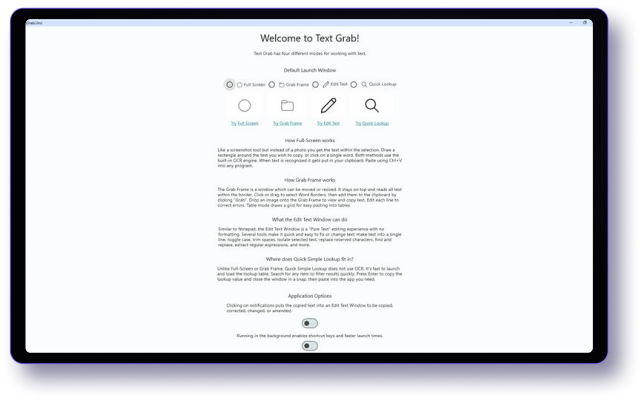
Text-Grab
A production WPF OCR utility with 84 C# files, multi-language support, custom rendering, and system clipboard integration. Migrated to Uno Platform in 7 structured phases — the WPF app continued shipping throughout.
AI agents handled the initial XAML translation. MCP servers verified each phase against the running app. The result: Windows + WebAssembly from a single codebase, with the option to add mobile targets.
C# files migrated
84
Localization languages
4
Migration phases
7
Target platforms
Windows + Wasm
AI-assisted
MCP-verified
Architecture
MVVM → MVUX
Production status
Shipped
capability comparison
Feature comparison for migration evaluation
XAML dialectWPF XAMLTarget platformsWindows onlyWeb deploymentNot availableMobileNot availableArchitectureMVVM / Prism / customThemingCustom / Windows chromeHot ReloadLimited (VS only)Visual designerVS designer (design-time)AI development toolsNot availableRendering engineWPF / DirectX.NET version.NET Framework or .NET 9LicenseProprietary (Microsoft)Frequently asked questions
Your C# business logic, data access layers, service classes, and .NET libraries transfer without modification — they’re standard .NET. XAML markup requires targeted changes: namespace syntax, replacing triggers with VisualStateManager, and adapting WPF-specific controls to their WinUI equivalents. For most LoB applications, 80–90% of C# code reuses directly. XAML files need per-file review, but the structure and data bindings typically carry over with mechanical changes — not architectural rework.
Uno Platform supports controls from Syncfusion, Windows Community Toolkit, LiveCharts, MapsUI, and others that provide WinUI targets. For WPF-only controls (some DevExpress and Telerik suites), you have two options: use Uno’s MAUI Embedding feature to host MAUI-compatible controls, or replace with equivalent Uno Toolkit and Community Toolkit components. We recommend auditing your third-party dependencies early in the assessment phase.
Yes. Uno Islands lets you embed Uno Platform controls inside your existing WPF application shell. New features ship as cross-platform Uno modules while legacy screens remain in WPF. Your production release schedule is unaffected. Teams typically migrate module by module over 2–4 quarters, validating each phase independently before proceeding.
No. WinUI XAML is an evolution of the XAML dialect you already know. The core concepts — data binding, dependency properties, templates, styles, visual tree — are the same. The differences are specific: namespace declaration syntax changes from clr-namespace to using:, triggers are replaced by VisualStateManager, some panel types differ, and theming uses a resource-based system. It’s more like moving between regional dialects of the same language than learning a new one.
Uno Platform renders via Skia — the same engine behind Chrome and Flutter — delivering consistent, hardware-accelerated performance across all platforms. On Windows, you can also target native WinUI for zero-overhead rendering. For data-heavy LoB scenarios (large grids, complex dashboards, real-time updates), Uno’s rendering architecture is designed for exactly these workloads. TradeZero, a publicly listed trading platform, chose Uno Platform specifically for performance-critical financial interfaces.
Uno Platform offers priority support tiers for enterprise customers, including dedicated engineering contacts. The platform is Apache 2.0 licensed — your legal team can audit the entire codebase. Uno Platform is used in regulated industries including financial services (TradeZero), healthcare, and automotive (Toyota). Enterprise migration engagements with hands-on architecture guidance are available — contact our team to scope your project.
Blazor is web-first (HTML/CSS/Razor) — it requires fundamentally different UI skills. MAUI targets mobile and desktop but doesn’t support Web or Linux, and uses Xamarin.Forms-derived abstractions. Avalonia shares WPF’s rendering model but has a smaller ecosystem and no AI tooling story. Uno Platform is the only option that preserves your XAML + C# architecture, targets all 7 platforms including WebAssembly, and provides AI agent integration through MCP servers. The XAML migration path from WPF to WinUI is the most direct reuse of your existing codebase.
You point an AI agent (Claude Code, GitHub Copilot, or any MCP-compatible client) at a WPF XAML file. The agent proposes WinUI equivalents for each WPF-specific pattern — namespace changes, trigger replacements, control substitutions. The Uno Docs MCP gives the agent accurate API knowledge; the App MCP lets it verify the output against your running app’s visual tree. You review every proposed change in your IDE, approve or reject, and commit. It’s pair programming with an AI that understands both XAML dialects — not a magic “convert” button.
Start with one screen. Ship to every platform.
Your WPF investment isn’t legacy — it’s the foundation. Migrate at the pace your release schedule allows, validate each phase independently, and deliver your LoB applications to every surface your organization needs.
Uno Platform 5.2 LIVE Webinar – Today at 3 PM EST – Watch