57% less code, 52% less memory, 44% smaller deployment, ~92% feature parity. That last number is the one I want to be upfront about. We didn't hit 100%. Understanding where the gaps are is more useful than pretending they don't exist.
WPF apps are deeply individual, each one uses a different mix of controls, Windows APIs, code-behind patterns, and third-party libraries. No migration guide can predict what yours will look like.
So instead of telling you "migration is easy, just do it," I want to tell you what actually happened when we ported a real WPF application: the parts that went well, the parts that didn't, and the patterns where you should set your expectations honestly before you start.
The App: Text-Grab
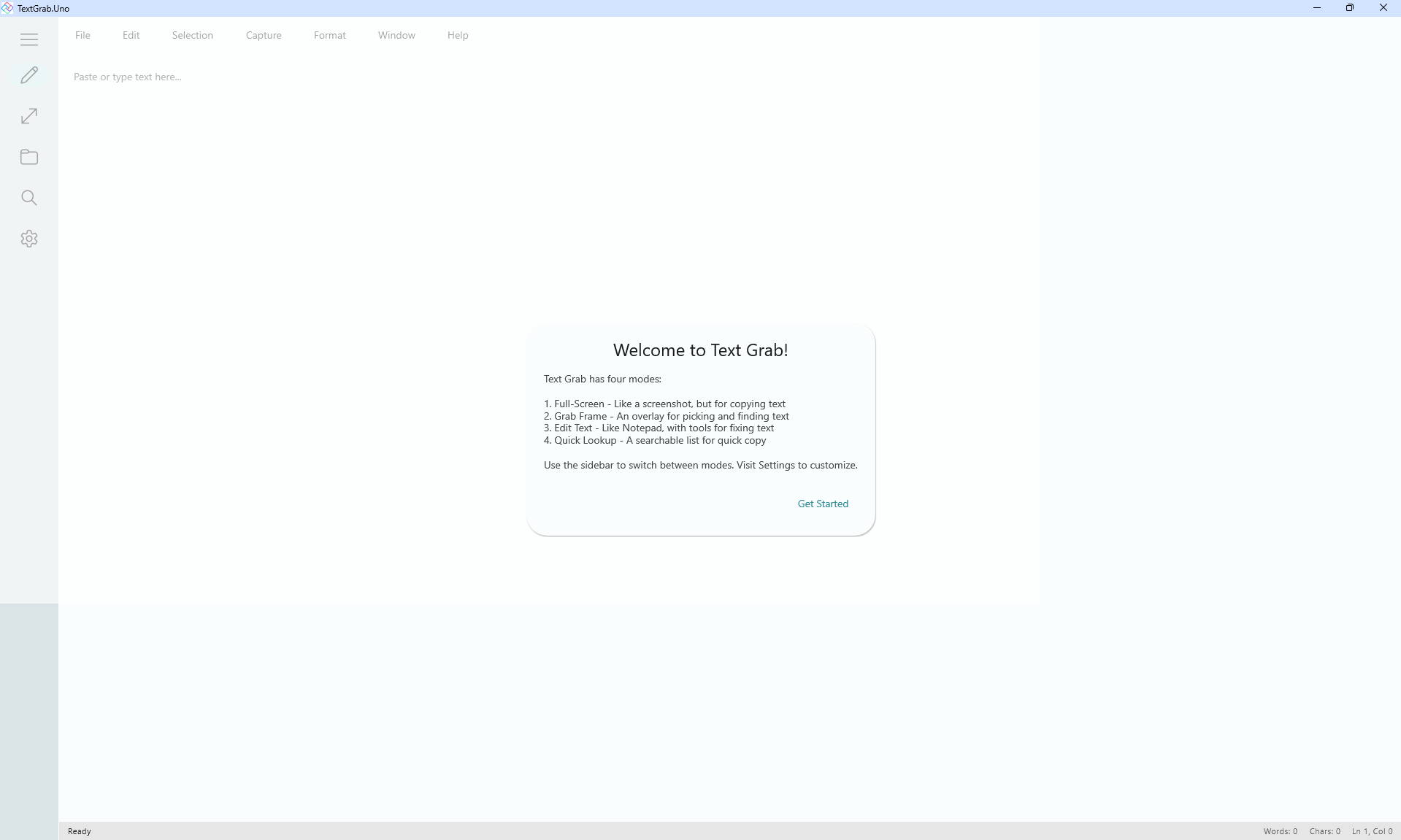
Text-Grab is an open-source Windows OCR utility created by Joe Finney. It's not a toy app: 15+ windows, WPF-UI controls, Windows.Media.Ocr, canvas overlays with hit testing and coordinate transforms, Properties.Settings.Default, and years of active use.
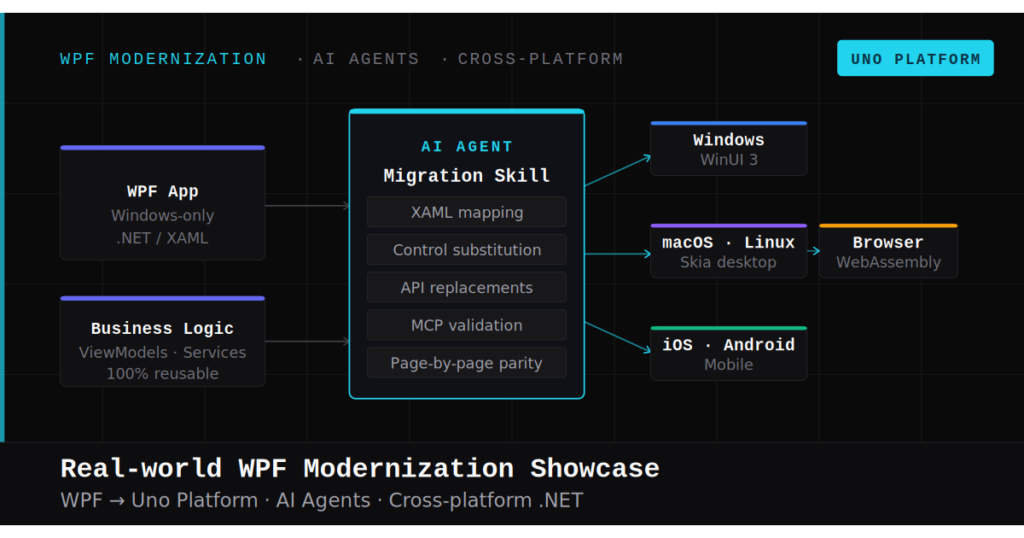
We migrated it to Uno Platform in 7 phases using an AI agent (Claude Code) for mechanical translation and MCP servers for verification.
Source Code
| Metric | WPF | Uno | Change |
|---|---|---|---|
| C# files | 113 | 99 | -14 (-12%) |
| C# lines | 29,647 | 12,888 | -57% |
| XAML files | 33 | 22 | -11 (-33%) |
| XAML lines | 7,582 | 2,288 | -70% |
| Platforms | Windows | Windows + WebAssembly | +1 |
| Feature parity | Baseline | ~92% | Honest delta |
Runtime Performance (Release builds, 3-run average)
| Metric | WPF | Uno | Change |
|---|---|---|---|
| Working set | 389.6 MB | 188.4 MB | -52% |
| Private memory | 289.6 MB | 99.9 MB | -65% |
| Threads | 61 | 25 | -59% |
Deployment Size
| Metric | WPF | Uno | Change |
|---|---|---|---|
| App DLL | 1,187 KB | 798 KB | -33% |
| Output directory | 280 MB | 156 MB | -44% |
| DLL dependencies | 80 | 188 | +108 |
The Uno version uses 52% less memory and 59% fewer threads at runtime, not because we optimized, but because the architecture is fundamentally lighter. Single-window navigation eliminates the overhead of 15 independent Window instances. DI + MVUX is leaner than WPF's static singleton pattern. SkiaSharp replaces 70 MB of ImageMagick native binaries at zero additional cost.
The honest headline: 57% less code, 52% less memory, 44% smaller deployment, ~92% feature parity. That last number is the one I want to be upfront about. We didn't hit 100%. Understanding where the gaps are is more useful than pretending they don't exist.
What Translated Cleanly
- Pure C# logic. String utilities, models, enums, parsers, text manipulation. About half the C# codebase ported with zero semantic changes. Years of battle-tested domain logic that just works on a new platform.
- Simple UI pages. QuickLookup (ListView with search, filtering, item templates) was practically a 1:1 translation.
- Service abstraction. WPF had static singletons. The migration forced a refactor to 14 DI-registered service interfaces (OCR, clipboard, file I/O, notifications). This was always the right architecture; migration gave us the reason.
- Settings.
Properties.Settings.DefaultbecameIWritableOptions<AppSettings>. Clean and repeatable once you understand thatSection<T>()auto-registers both read and write interfaces. - Canvas overlays. GrabFrame's selection rectangles, hit testing, drag handles, and coordinate transforms ported once we mapped the pointer event model (
MouseDown→PointerPressed,CaptureMouse()→CapturePointer()).Canvasitself is identical. - Theming. ImageMagick (70 MB native binaries) → SkiaSharp (ships with Uno at zero cost). Material Design 3 replaced custom Fluent palettes with a single color seed (#308E98 teal) generating the entire system.
What Didn't Translate 1:1
This is the section most migration blog posts skip. I think it's the most valuable part.
Multi-window architecture → single NavigationView
This was the biggest architectural change, and it's not optional. WPF made multi-window easy, so Text-Grab used 15+ independent Window instances. Uno Platform uses a single window with NavigationView + Frame page navigation. Every window had to be classified as a Page (navigable), ContentDialog (modal), or Flyout (contextual).
What you gain: Unified navigation, back button support, sidebar discovery. Users literally found features they didn't know existed because they were buried in other windows.
What you lose: Floating detached windows. GrabFrame was a transparent overlay you could position anywhere on screen. It's now a page locked inside the main shell. For some apps (image editors, floating palettes, multi-monitor setups) this is a real constraint, not just a style change.
If your app depends on detached floating windows: Understand this trade-off upfront. Single-window navigation is an architectural requirement, not a suggestion.
Navigation re-visitation doesn't work declaratively
This was our most time-consuming debugging session. We tried three approaches to navigate between settings sub-pages: Visibility navigator (rendered blank inside NavigationView, no error), Frame with region-based routing (worked once, then subsequent clicks were no-ops), and manual Frame.Navigate() in SelectionChanged handlers (worked perfectly).
The working solution is the least "Uno-like" one. We lost declarative routing elegance but gained full control. If your app has tabbed or sidebar navigation where users revisit the same pages repeatedly, plan to work around this.
RoutedCommand doesn't exist in WinUI
WPF's RoutedUICommand + CommandBindings pattern has no WinUI equivalent. Every command needed conversion: simple menu actions → direct method calls, keyboard shortcuts → KeyboardAccelerator (these actually execute, unlike WPF's InputGestureText which was display-only), undo/redo → custom state stack.
Global hotkeys register but don't fire
Text-Grab uses P/Invoke RegisterHotKey for system-wide keyboard shortcuts. The service migrated, the registration calls succeed, but there's no WndProc message handler to receive WM_HOTKEY. Uno doesn't expose WndProc directly. Hotkeys are registered. They never fire. This is a genuine framework limitation that requires HWND subclassing interop to resolve.
Screen capture captures itself
The fullscreen overlay revealed an architectural gotcha: you can't recapture the screen while your own fullscreen WinUI window is visible. The fix is capture-once-crop-many: grab a screenshot before showing the overlay, then crop based on the user's selection. Not obvious. Discovered through trial and error.
We also found DPI scaling bugs: selection rectangles misalign on HiDPI displays (150%+) because UI coordinates are in DIPs but captured images are in physical pixels. Multiply by XamlRoot.RasterizationScale. Nobody tells you this until it breaks.
The Features We Didn't Ship
Here's where I think honesty matters most.
- System integration (the largest remaining gap): Global hotkeys register via P/Invoke but never fire. System tray is minimal (show/exit only, no context menu). Startup-on-login toggle exists in settings but the registry write isn't wired. Minimize-to-tray on close isn't implemented.
- EditText: The Calculate Pane and AI menu (Summarize/Translate/Extract) call Windows-specific APIs with no cross-platform fallback yet. Multiple simultaneous editor windows aren't possible under single-window navigation.
- Multi-monitor capture: FullscreenGrab captures the primary monitor only. Replacing
GetSystemMetricswithEnumDisplayMonitorsis on the list. - Windows AI OCR: Engine interface exists, returns null. The SDK is ARM64-only and still preview. Tesseract fills the gap on x64.
Some are solvable with more time (system tray context menu, multi-monitor capture, registry-backed startup). Some are framework limitations that may resolve in future releases (WndProc access, Windows AI SDK). Some are architectural trade-offs you accept for cross-platform reach (single-window model, multiple editor windows).
Where the AI Agent Struggled
The AI handled mechanical translation well: over 200 namespace renames, zero misses. Boilerplate generation was near-perfect. Pattern replication (once I corrected the first settings page, it applied the fix to five more without deviation) was its genuine superpower.
Where it fell apart:
- Silent XAML failures. A wrong
ThemeResourcekey renders a blank page. No compile error. No runtime exception. The agent can't diagnose what it can't observe. MCP visual verification caught these, but it's slow. - Architectural judgment. Which window becomes a Page vs. ContentDialog vs. Flyout? Singleton or transient service? The agent can implement any answer; it can't choose the right one.
- Framework intuition. The
_isLoadingtoggle guard, the Frame vs. Visibility navigator distinction, the Material resource key naming convention: you learn these by building Uno apps, not by reading docs. - Scope creep. Left unchecked, the agent added XML doc comments, introduced error handling for edge cases not in the original, and "improved" code beyond the task. The CLAUDE.md constrained this, but it required regular redirection.
What This Means for Your App
Your migration will be straightforward if:
- You have clean MVVM with dependency injection
- Your UI is mostly standard controls (TextBox, ListView, Grid, Button)
- You don't rely on detached floating windows
- Your platform-specific API usage is limited
- You use WPF-UI or ModernWpf (closest to WinUI)
Your migration will be moderate if:
- You have a mix of MVVM and code-behind
- You use 5-15 windows that need Page/Dialog classification
- You have some platform-specific APIs (OCR, clipboard, file system)
- You rely on
Properties.Settings.Default - You have
Style.TriggersorDataTriggersto convert to VisualStateManager
Your migration will be hard if:
- You depend on floating, detachable windows for core workflow
- You use commercial control suites (Telerik, DevExpress, Syncfusion)
- You have heavy custom rendering (GDI+, Direct2D, SharpDX)
- You rely on global hotkeys, system tray, or Windows shell integration
- You have
RoutedCommandpatterns with complex command routing
Your migration may not be viable today if:
- Your app's core value depends on WndProc message hooks
- You need deep Win32 interop that hasn't been mapped to WinUI
- You rely on Adorners (no WinUI equivalent)
- Your app is fundamentally a multi-window desktop tool where windows can't be combined (think: IDE with detachable panels)
That last category isn't a permanent "no." It's a "not yet." Frameworks evolve. What matters is knowing where your app sits before you invest time and tokens.
The Contract File Is More Important Than the AI
The counterintuitive conclusion: the migration contract matters more than the agent executing it.
A clear CLAUDE.md with explicit architectural decisions, API mappings, and anti-patterns turns an AI agent into a productive migration partner. Without it, you're pair-programming with an enthusiastic junior developer who types fast but has never seen your codebase.
The spec doesn't need to be exhaustive on day one. We added to CLAUDE.md after every new gotcha: wrong navigator type, wrong resource key pattern, wrong scope boundary. By Phase 7, the document captured hard-won knowledge that would be valuable to any WPF developer, AI or no AI.
If you're considering an AI-assisted migration: start with the spec, not the agent.
MCP Closes the Verification Loop
MCP (Model Context Protocol) was the difference between "AI writes code" and "AI migrates an app." The agent builds the project, launches it, inspects the visual tree, takes screenshots, and verifies its own work. Without MCP, the silent XAML failures (blank pages from wrong resource keys, invisible content from wrong navigator types) would have been excruciating to debug. With MCP, they're caught in the same session they're introduced.
If you're doing AI-assisted UI work without visual verification, you're flying blind. The code can compile perfectly and render nothing.
The Bottom Line
Text-Grab's migration is a net positive. The code is cleaner (57% LOC reduction isn't just from missing features; MVUX eliminates real boilerplate). The architecture is stronger (DI, services, immutable state). It runs on 3 platforms instead of 1. And ~92% of features made the crossing.
But it's not 100%. And I think that's a more useful story than pretending it is.
If you have a WPF app you're considering migrating, here's my honest advice: port one screen. One afternoon. See what happens. You'll learn more from a single real screen than from any case study, including this one.
The patterns that translate easily will surprise you. The patterns that don't will calibrate your expectations. And that calibration is worth more than any migration promise.