This post is a part of 2025 C# Advent Calendar – a month long showcase of .NET developer goodness.
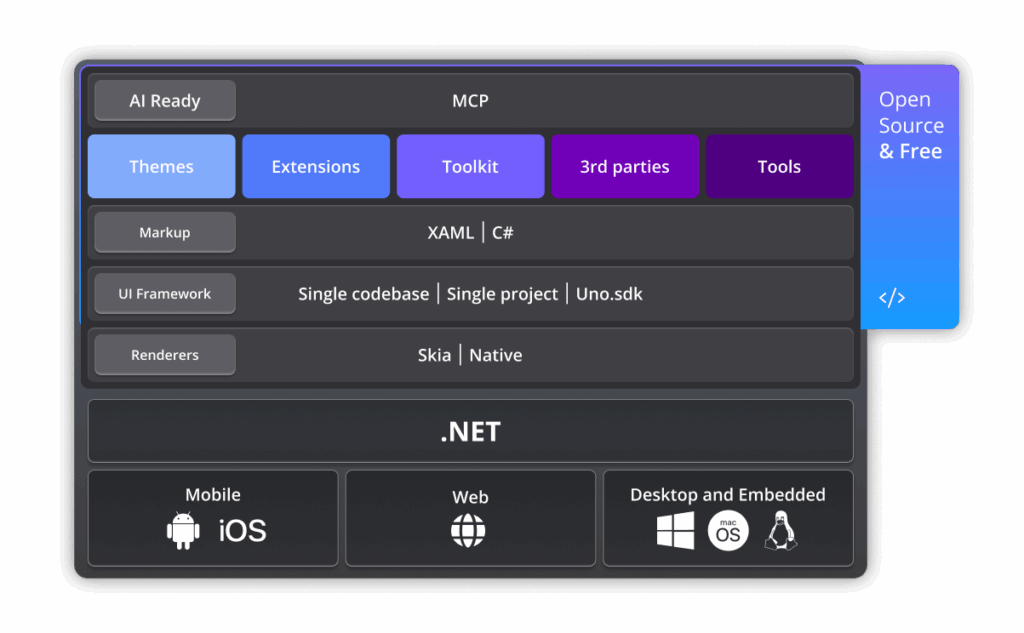
Uno Platform is the most flexible open-source platform for modern cross-platform .NET development, complete with enterprise-grade AI and visual design tools. Paired with Uno Platform Studio, .NET developers can get a serious boost in productivity with the fastest C#/XAML dev loop, dependable AI Agents/MCP tools, runtime visual designer and flexibility in technology stack – all towards building apps from any OS/IDE to run on mobile, web, desktop or embedded devices.
When we say ‘Uno Platform – Now With AI‘, what do we mean? Let’s unpack ..
The Age of AI
As modern .NET developers look to build the next generation of apps, AI’s influence is hard to ignore. There is a huge opportunity for developers to infuse apps with solutions powered by generative AI and large/small language models – the end result should be smarter apps and better user experiences. Modern AI is also an opportunity to streamline and automate developer workflows for better productivity – AI can do much of the mundane code writing, freeing up developers to review code and guide architectural decisions.
Today’s generative AI Models are powerful systems capable of understanding human natural language to hold conversations and respond to prompts with text, code, audio, video and other types of creative content. However, AI models need grounded knowledge and in-depth platform understanding to be really helpful in software development – context is everything. As we graduate to more Agentic workflows for software development where AI Agents perform concrete actions on behalf of users, context would be key – specialized tools that can provide grounding and help AI perform repeatable tasks.
While no one should trust AI blindly, here is a hot take: It simply does not make sense for software developers to do certain things by hand. AI is simply better and quicker at taking the first stab.
Uno Platform embraces AI responsibly with human-in-the-loop, enabling superior productivity for .NET developers – modern AI tools should have deeply contextual knowledge. AI that has eyes and hands can be true developer sidekick – Let’s see how.
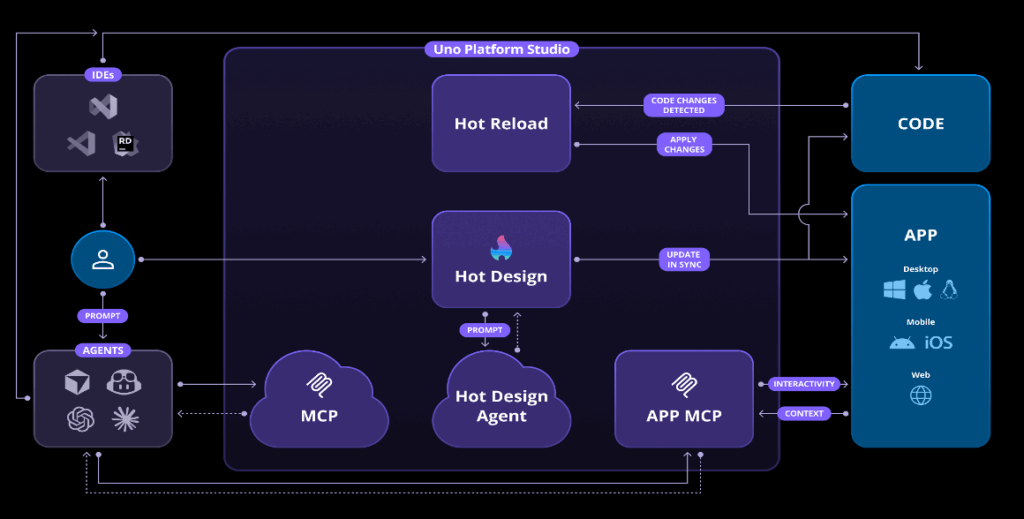
MCP Tools
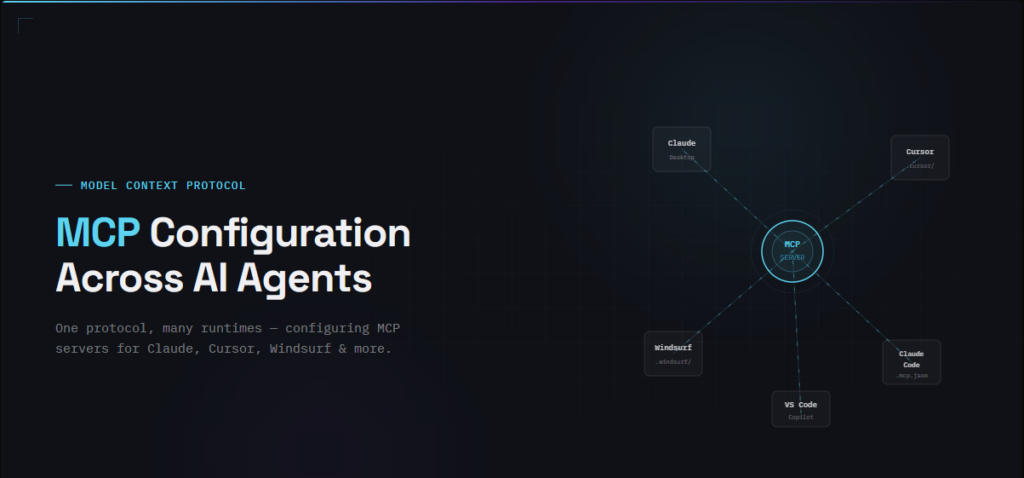
Model Context Protocol (MCP) is an industry protocol that standardizes how applications provide context to AI Models/Agents — developers can think of it as a common language for information exchange between AI Models/Agents and custom endpoints with specialized tooling. With the latest Uno Platform 6.4 release and Uno Platform Studio 2.0 update, there are two new MCPs Servers that expose grounded specialized tools to AI.
- The Uno Platform Remote MCP | Provides prompts and grounded responses from up-to-date documentation
- The Uno Platform Local App MCP | Providing interactive access to running Uno Platform apps
Once wired up, Uno Platform MCP tools are available to any AI Agent being used in software development – the likes of GitHub Copilot, Claude, Cursor, Codex and more. AI Agents do have the autonomy to invoke Tools as needed to perform tasks – a gentle nudge like “Make sure to leverage Uno Platform MCP Tools .. ” usually does the trick.
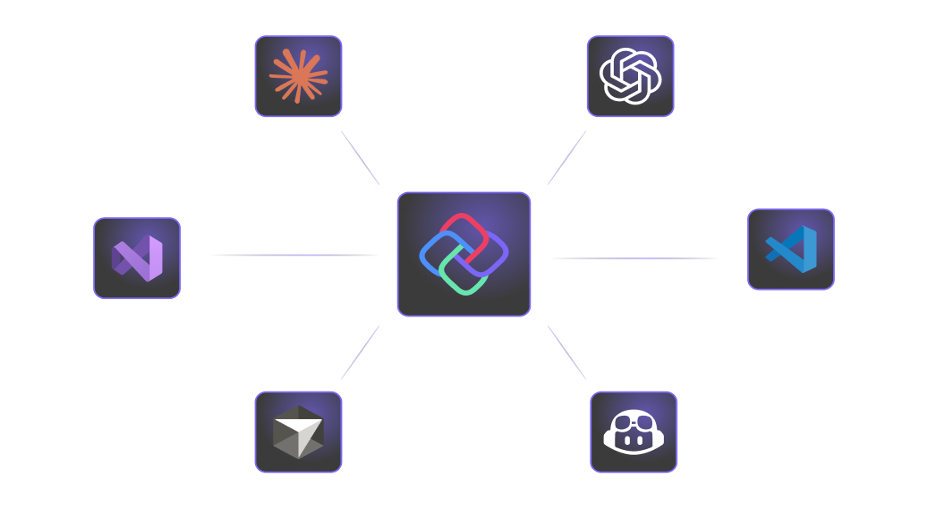
Uno Platform MCP
Hosted remotely, the Uno Platform MCP has one clear goal – bring all the wealth of knowledge to the fingertip of anyone building with Uno Platform. This MCP Server provides set of prompts to create and develop with Uno Platform:
- /new | This is used to create a new Uno Platform app with the best practices in mind.
- /init | This is used to ‘prime’ AI chat with Uno’s best practices, generally used while adding new features in existing apps.
The Uno Platform MCP Server also exposes MCP Tools to help AI Agents perform tasks with greater confidence:
- unoplatformdocssearch | Used by Agents to search for specific topics – it returns snippets of relevant information.
- unoplatformdocsfetch | Used by Agents to get a specific document, grabbed through unoplatformdocs_search.
- unoplatformagentrulesinit | Used by Agents to ‘prime’ the environment on how to interact with Uno Platform apps during development.
- unoplatformusagerulesinit | Used by Agents to ‘prime’ the environment on how to use Uno Platform’s APIs in the best way possible.
Uno Platform App MCP
The Uno Platform App MCP Server runs locally and provides AI Agents with the ability to interact with a running app, in order to click, type, analyze or screenshot its content.
This MCP Server provides MCP Tools that give “eyes” and “hands” to AI Agents in order to validate their assumptions regarding the actions they take, and the code they generate.
- unoappgetruntimeinfo | Used to get general information about the running app, such as its PID, OS, Platform etc.
- unoappgetscreenshot | Used to get a screenshot of the running app.
- unoapppointerclick | Used to click at an X,Y coordinates in the app.
- unoappkeypress | Used to type individual keys (possibly with modifiers).
- unoapptypetext | Used to type long strings of text in UI controls.
- unoappvisualtreesnapshot | Used to get a textual representation of the visual tree of the app.
- unoappelementpeerdefaultaction | Used to execute the default automation peer action on an UI element.
- unoappclose | Used to close the running app.
- unoappelementpeeraction | Used to invoke a specific element automation peer action.
- unoappgetelementdatacontext | Used to get a textual representation of the DataContext on a FrameworkElement.
From the list above, only the last two MCP Tools are part of the Uno Platform Studio Pro license – rest are all included in the Community license.
Hot Design Agent
While Uno Platform provides the most flexible open-source platform for cross-platform .NET developers, Uno Platform Studio builds on it with tooling worthy of professional .NET developers. With Hot Design, Hot Reload and Figma Design-to-Code, developers can build modern .NET apps much more visually – the inner developer loop is drastically shrunk to elevate developer productivity.
Uno Platform Studio now adds the Hot Design® Agent – an AI-powered assistant that enables rapid UX/UI creation and enhancement within running Uno Platform apps. It leverages data contexts and live previews to help developers design, refine, and interact with user interfaces in real time, using deep knowledge of Uno Platform and the running app to simplify cross-platform .NET design.
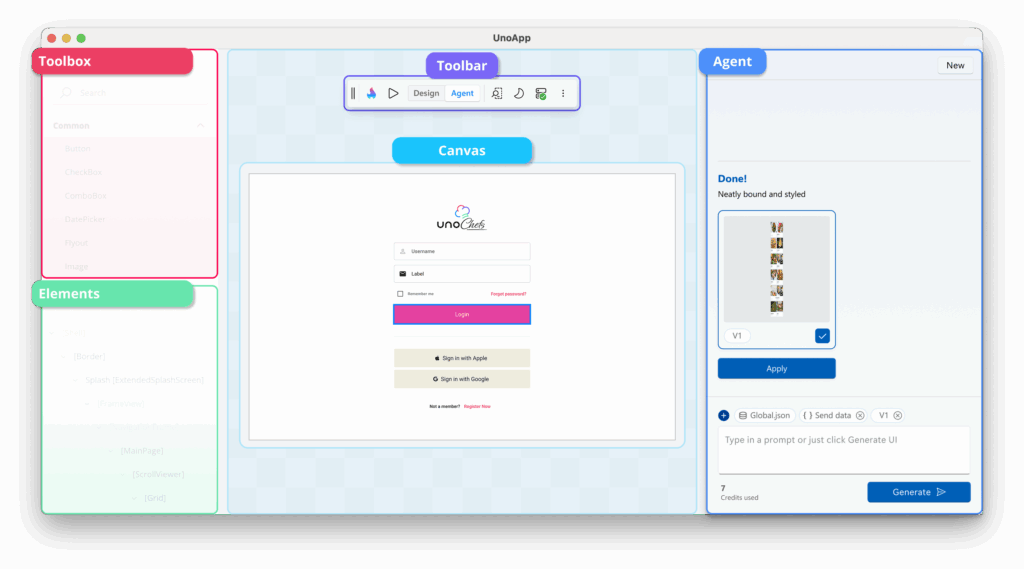
Operating inside the same live Hot Design running app surface, the Hot Design Agent (in Preview) can read layout hierarchies, detect UI controls, analyze bindings, and reason about visual structure through the same runtime context exposed by Uno Platform App MCP. Once an Uno Platform app is running on any target platform, developers can get into Hot Design and toggle the toolbar to Agent mode to start interacting with the Hot Design Agent. Developers can prompt the Hot Design Agent to suggest UI updates, align layouts, apply styles, or reorganize components, all without writing a line of XAML.
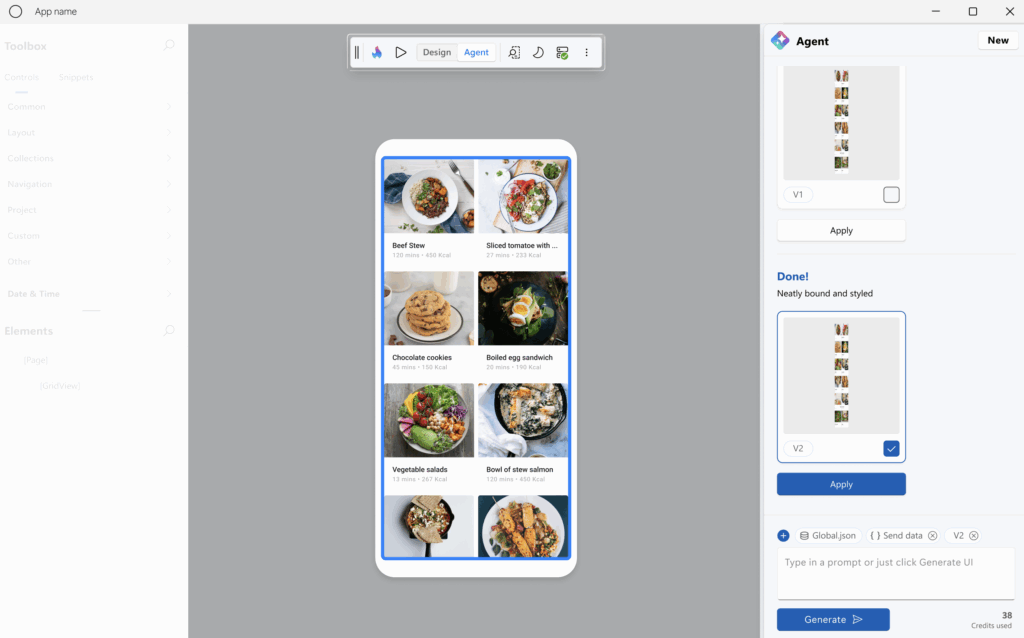
All Hot Design Agent actions are transparent, reversible, and run within preferred IDE for full developer control. Unlike IDE-based AI Agents that automatically modify source code and trigger Hot Reload, Hot Design Agent allows developers to preview its proposed changes first, giving full visibility and control before making code changes. Developers can go back in AI chat history to choose proposed UI – only the developer-approved updates are applied to UI and code changes committed back in the IDE.
The result is a new level of collaborative AI-Human intelligence. Developers can iterate faster, delegate repetitive layout tasks to AI, or even prototype complete UI screens from a prompt – welcome to Hot Design Agent for Uno Platform.
Developer Flows
With Uno Platform development now offering so much of AI tooling, one might wonder how best to start? What’s the optimum way to leverage MCP Servers or utilize the Hot Design Agent?
Well, each developer is different and so should be our workflows – there is no right or wrong, simply what works best for you. Here are some common developer flows:
- Start with your chosen IDE on any OS. Create a new app using Uno Platform Extensions. Wire up MCP Tools and use your beloved AI Agent like GitHub Copilot. Iterate on UI.
- Start with AI Agentic tools like Claude/Cursor. Dream up your app. Have conversations to come up with detailed brief. Have AI Agents create Uno Platform app with pixel-perfect UI.
- Start with CLI tools like Codex/Copilot CLI/Claude Code. Create a detailed plan for an Uno Platform app. Generate app and iterate from within CLI.
- Create a blank Uno Platform app from CLI/Template. Skip all the MCP tools. Run empty app and pull up Hot Design Agent. Generate UI from prompts and iterate.
- Start with Uno Platform Templates to create a nice shell of an app with UI. Write some UI by hand. Run it. Pull up Hot Design Agent to tweak UI.
- Start with a screenshot of an app. Ask AI Agents to create an Uno Platform app with a starting screen that matches the screenshot. Use fake data to start. Iterate to add functionality.
- Working with a deisgner? Start from Figma designs and use the Uno Platform Figma Plugin to generate XAML/C#. Iterate with AI.
- Have app designs exposed through Figma MCP Servers? Choose an AI Agent and have it point to Figma MCP. Generate app with best guidance from Uno Platform MCPs.
- Use any combination of the above. Mix and match. Sit back and marvel at what AI can generate.
Developer Inspiration
Whatever be your chosen developer workflow, we hope you are ready to be amazed. Modern AI Models and Agents combined with grounded tools can be absolutely amazing. Sure, you can have a bad run or two, but have the patience to iterate until AI can get it right. There are Uno Platform docs to help developers get started right – choose your preferred OS/IDE/AI Agent combination and make your app dreams come alive.
We have been having a lot of fun with Uno Platform and modern AI tools – honestly, blown away by what we can create. There is no dearth of developer inspiration – here’s some:
DEV.To Challenge

DEV.To is a vibrant community where developers hang out, learn from each other and stay tuned to latest trends. For a 3 week period, we teamed up with DEV.To to run a contest – AI Challenge for Cross Platform Apps. We asked the DEV community to take a stab at modern .NET apps with Uno Platform and AI across three different categories – Wow-worthy UI, Design showcase and AI chops. The DEV community responded with 40+ submissions and some truly amazing showcase of apps – there are big prizes for winners in each category. Please stay tuned for the winner announcements ..
12 Days of Christmas
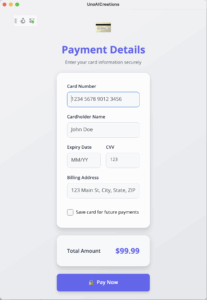
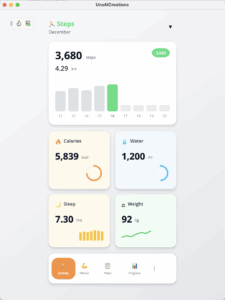
As 2025 draws to a close, the Holiday Season is upon us – the most wonderful time of the year. Inspired by the popular Christmas carol 12 Days of Christmas, we came up with a tech twist – 12 cross-platform builds in 12 days. The idea is simple – push the limits of what can be built with .NET, Uno Platform and AI. From design-inspired modern fresh app creations to amazing animations – everything has to be done with AI tooling. The results have been awe inspiring – it would take experienced .NET/XAML/C# developers days to come up with anything close to what AI can create in minutes. Follow along our social media posts for 12 Days of app inspirations .. here’s a sampling of what’s possible, purely from a few prompts.
Show Me a Contest

If Uno Platform updates and AI tooling has your interest piqued with what’s possible with modern .NET, come and join us for a Uno Platform webinar on Dec 16th, 2025. We’ll close the year on a high and showcase much of the AI tooling in action – and give developers another chance to win some cold hard cash, just in time for the holidays. We’ll share an AI prompt during the webinar – show us what you can build with Uno Platform and Agentic workflows, and you could walk away as a winner.
Conclusion
We can recap all the things – but developers get the point. Uno Platform with AI is the next generation of .NET cross platform development – we can’t wait to see what you build.
Next Steps
Ready to boost your productivity and simplify cross-platform .NET development? Try Uno Platform today by downloading our extension for your preferred IDE and join our developer community.