Uno Platform 6.6 closes the multilingual gap for cross-platform .NET: full IME composition, Unicode-correct text handling (from 6.5), and automatic font fallback now work together out of the box — and a Deepgram-powered sample even reads the text back out loud.
Software doesn't ship to one country anymore. It ships to everyone, all at once — and if your app can't handle a customer typing in Japanese, reading in Arabic, or hearing a confirmation message in their own language, you've already lost part of your audience before they've even opened a menu.
Let's unpack what it actually takes to build a cross-platform .NET app that speaks the world's languages — and how Uno Platform 6.6 just made that dramatically easier.
Why Language Support Matters
Localization & Globalization
Localization used to be treated as a checkbox — swap out some strings in a .resx file, ship an app that's "technically" available in 12 markets, and call it a day. That's not what modern users expect anymore.
Real globalization means your app respects how people actually read, write, and speak. That's right-to-left text for Arabic and Hebrew. That's composed characters for Chinese, Japanese, and Korean. That's a font that doesn't fall over the moment someone types in Hindi or Georgian. Get this right, and your app feels native no matter where it's opened. Get it wrong, and every non-English user gets a constant, quiet reminder that they were an afterthought.
Maximize Reach
Here's the honest business case: English is not the internet's default language anymore, and it hasn't been for a while. Mandarin, Hindi, Spanish, Arabic, and dozens of other languages represent enormous, underserved developer and consumer markets. If your app's input fields choke on non-Latin scripts, or your UI renders tofu boxes instead of real characters, you're not just delivering a rough experience — you're closing the door on entire regions before a user gets past the sign-up screen.
Cross-platform .NET through Uno Platform already gets you to Windows, macOS, Linux, iOS, Android, and the browser with one codebase. Multilanguage support is what makes that reach actually count.
Explain the How
So what's actually involved in making an app "speak" every language? Three things, and each one is trickier than it looks.
IME (Input Method Editor). Languages like Chinese, Japanese, Korean, and Vietnamese can't be typed directly from a standard keyboard — there just aren't enough keys. Instead, users type a phonetic representation (like Pinyin or Romaji) and an IME composes it into the correct characters, often with an in-progress "candidate" view before the text is committed. If your text box doesn't understand IME composition, users simply can't type in these languages — full stop.
Unicode. This is the character-encoding standard that makes it possible to represent virtually every writing system in existence in a single format. But supporting Unicode isn't just "don't crash on non-ASCII bytes." It means correct caret positioning inside multi-byte grapheme clusters, correct selection behavior, and correct rendering direction — because Arabic and Hebrew flow right-to-left, and some scripts combine multiple code points into ligatures that behave as a single visual unit.
Font glyphs. Even once you've got the right characters, you need a font that can actually draw them. No single font contains glyphs for every script on Earth — Latin, CJK, Arabic, Devanagari, Georgian, Thai, and Cyrillic all typically live in different font families. Historically, developers had to hand-pick and swap fonts per language, or accept the dreaded "tofu box" — an empty square where a glyph should be.
Put those three together, and you've got the real technical bar for multilingual support. Most frameworks handle maybe one of these well. Uno Platform 6.6 handles all three.
Uno Platform 6.6 Brings in Full Language Support
This didn't happen overnight — it's been a two-release arc.
6.5 brought Unicode support. TextBox got proper handling of non-Latin scripts: correct caret positioning, mouse and keyboard selection across multi-byte characters, and arrow-key navigation between grapheme clusters instead of raw codepoints. If your keyboard could output the characters directly, Uno Platform could handle them correctly. The one gap: composition-based input — IME — wasn't there yet.
6.6 has full IME composition. That gap is closed. Uno Platform 6.6 adds complete IME composition support across Windows, WebAssembly, Android, iOS, macOS, and Linux. Users can compose, review, and confirm characters using whatever input method is already built into their OS — no extra configuration, no platform-specific workarounds. Type Pinyin, get Chinese characters. Type Romaji, get Kana and Kanji. Type Hangul components, get composed Korean syllables. It just works, out of the box, on every target.
And automatic font fallback. This is the piece that quietly makes everything else look good. A single TextBlock using the default font family can now render Latin, CJK, Arabic, Georgian, and other supported scripts side by side, in the same sentence, without a developer ever setting a FontFamily. Uno Platform resolves each glyph the default font can't draw through a fallback service automatically. No more mixing and matching font families by hand. No more tofu boxes.
Type it (IME), store and navigate it correctly (Unicode), and see it rendered properly (font fallback) — the full multilingual stack, working together, with zero extra configuration.
Walk Through of Multi-Language Support
Talk is easy — let's see it in action. I put together a sample app, UnoMultiLanguage, that demonstrates every piece of this working live, across a handful of scripts.
Let's See Things in Action
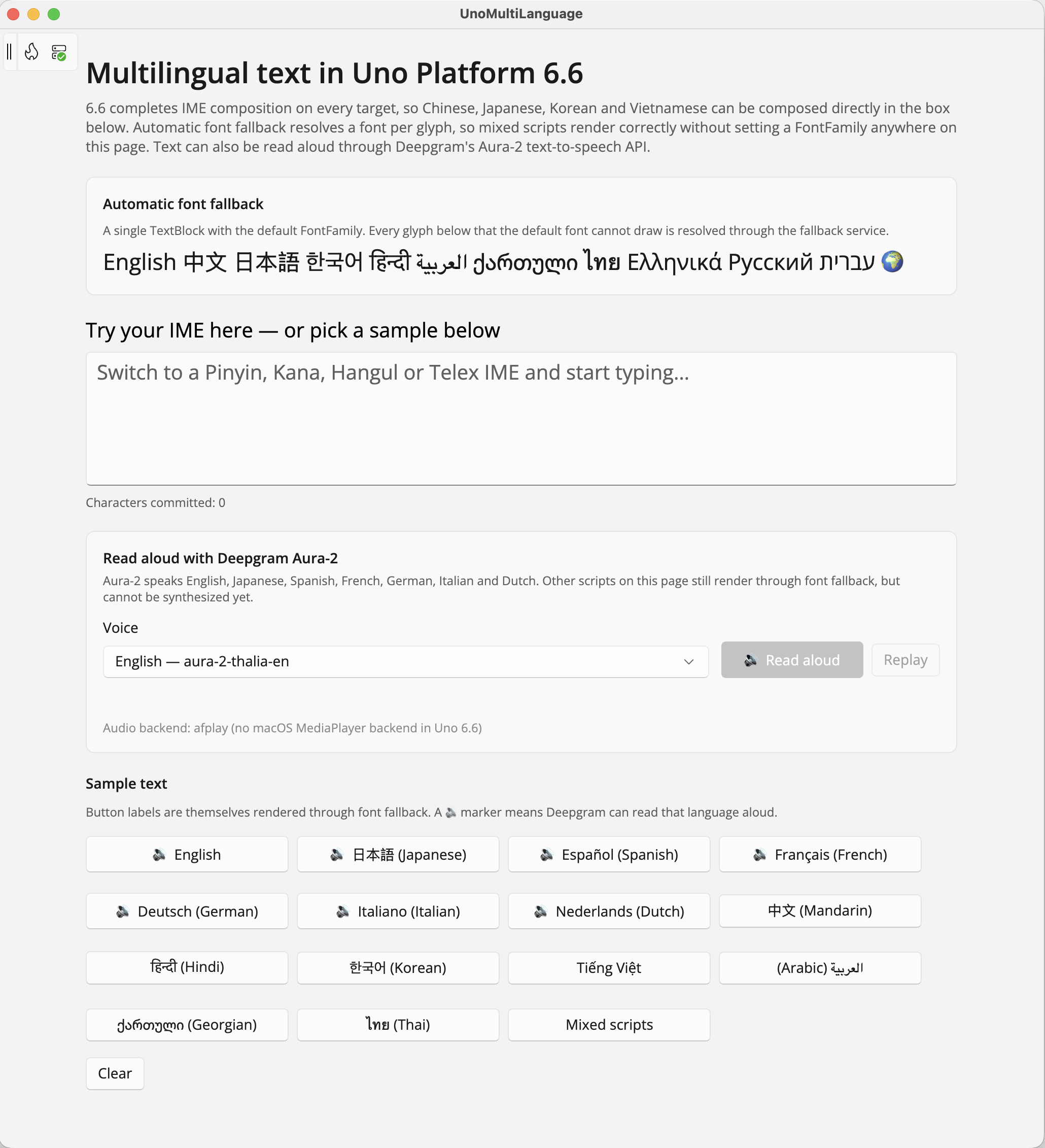
Here's the full app, front and center — an IME test box, automatic font fallback preview, and a voice readout section powered by Deepgram (more on that shortly).
Font Fallback in Action
This single line uses the default FontFamily — nothing custom set anywhere on the page. English, Chinese, Japanese, Korean, Hindi, Arabic, Georgian, Thai, Greek, Russian, Hebrew, and an emoji, all rendering correctly, side by side, resolved automatically per glyph.

IME Support Across Languages
Drop into the text box, and it's ready for whatever your OS input method throws at it.
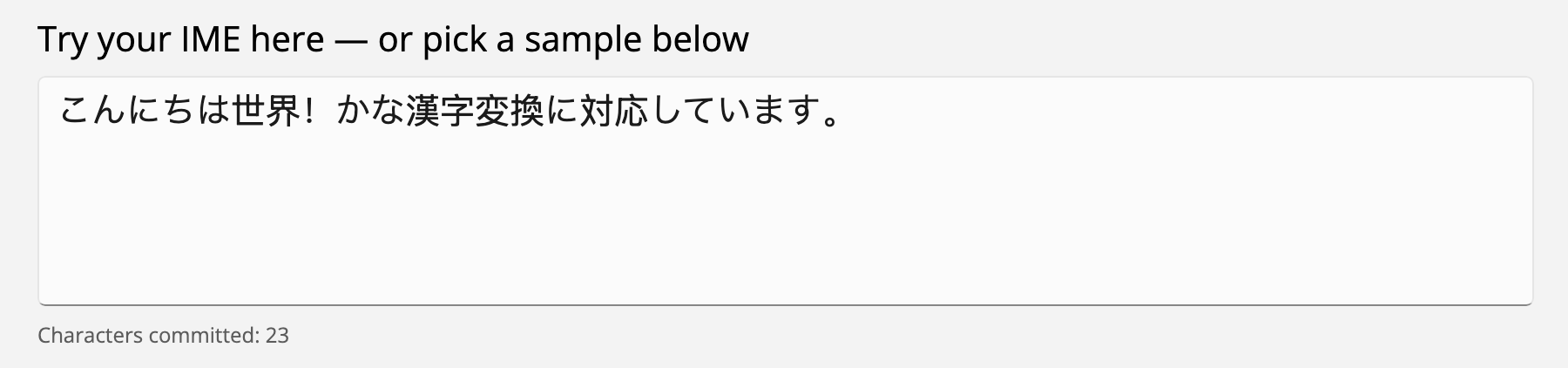
Switch to a Japanese IME, type in Romaji, and watch it compose into proper Kana and Kanji:
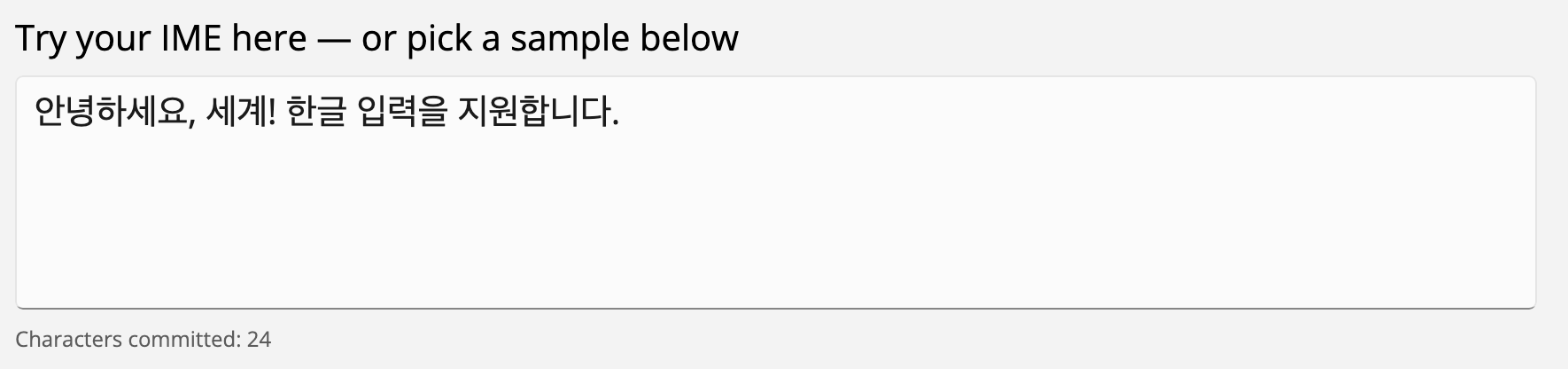
Same story with Korean — type Hangul components, and the IME composes full syllable blocks:
Pointing Out RTL Support
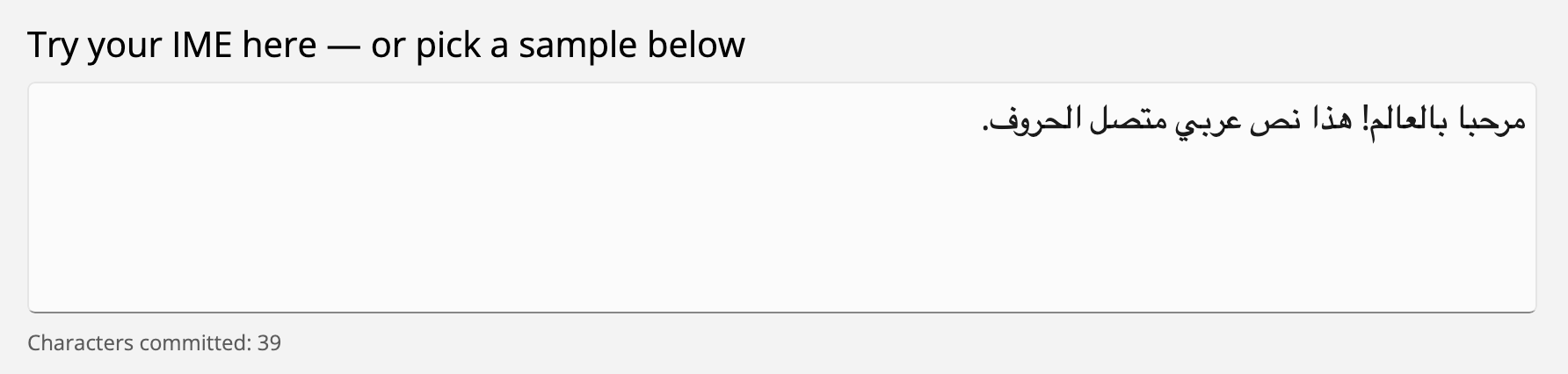
Right-to-left scripts get proper treatment too — correct text direction, correct caret behavior, correct rendering:
Mixing Scripts
And because font fallback works per glyph rather than per control, you can genuinely mix scripts in one sentence — English, Chinese, Japanese, Korean, Hindi, Arabic, Georgian, Thai, Greek, and Russian, all in a single line of committed text:
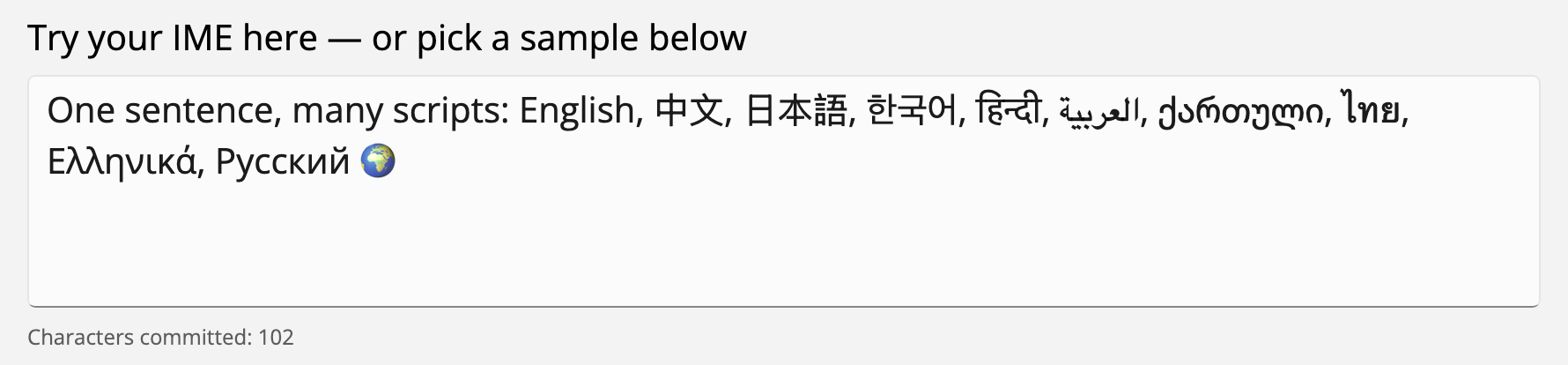
This is the kind of thing that used to require careful font juggling and per-language TextBlocks. Now it's just… text.
Adding Voice to Multi-Language
Reading and typing is half the story. The sample app goes one step further and reads text back out loud, in multiple languages, using Deepgram.
Deepgram offers a straightforward text-to-speech API — send text and an API key, get back audio. No local model to manage, no platform-specific speech engine quirks to work around across five operating systems.
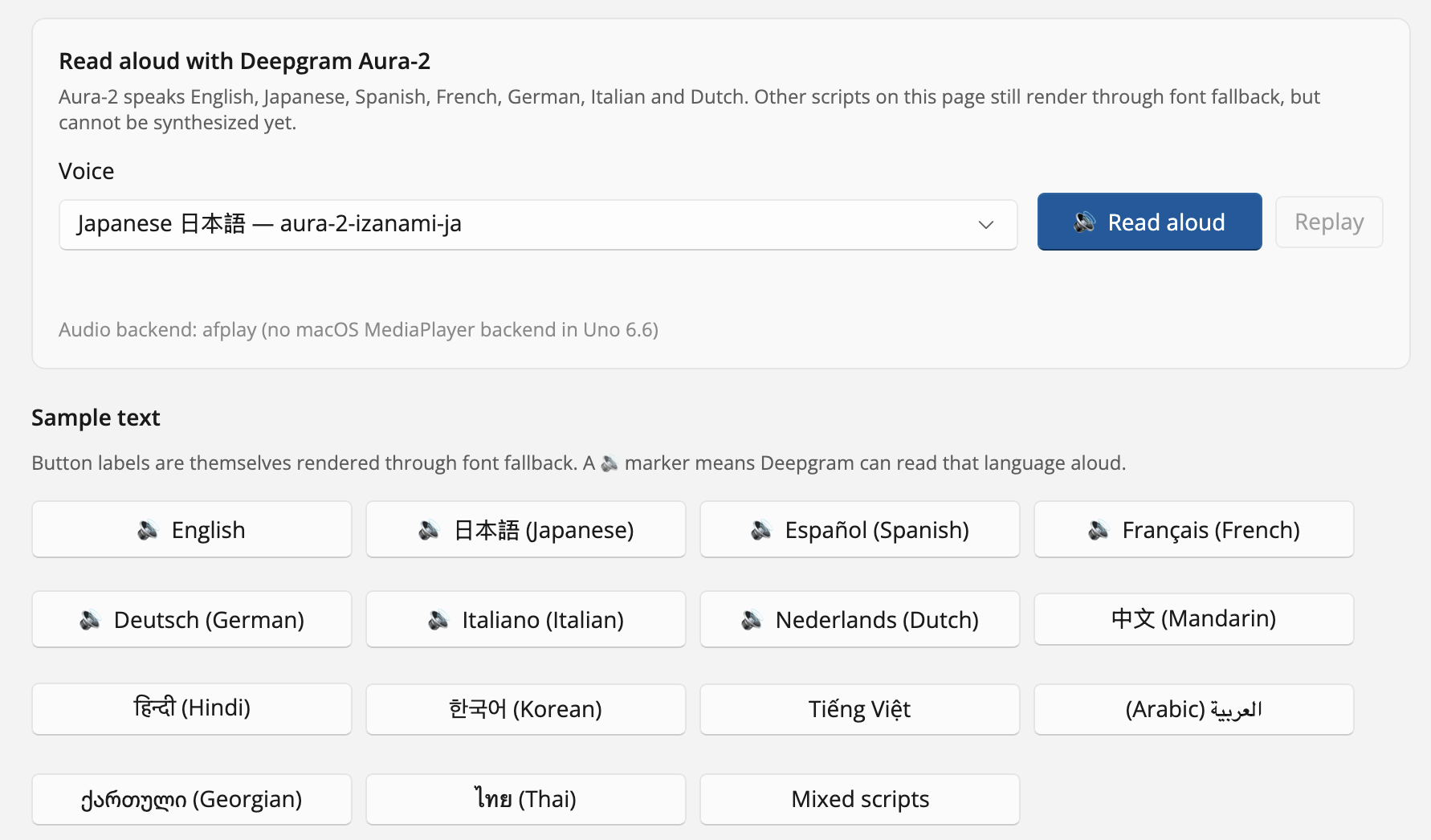
The voice model behind it is Aura-2, Deepgram's latest TTS model, and it currently speaks English, Japanese, Spanish, French, German, Italian, and Dutch through the app (other scripts on the page still render fine through font fallback — they just can't be synthesized yet). If you want to try it yourself before wiring anything up, Deepgram has a live playground where you can test different languages and voices right in the browser.
Here's the voice section in the sample app — pick a language, hit read aloud, hear it back:
Making the API Call and Playing It Back
The flow is simple end to end: the app sends the committed text plus a voice selector to Deepgram's /speak endpoint, gets audio back, and plays it through Uno Platform's local MediaPlayer on whatever platform the app is running on.
It's a small addition, but it completes the loop: type in any language, see it rendered correctly, and hear it spoken back. That's a genuinely accessible, genuinely global user experience — built with cross-platform C#/XAML and pure .NET for APIs.
Conclusion
Multilanguage support isn't a nice-to-have anymore — it's table stakes for any app that wants to reach the actual, global population of people who might use it. IME composition, Unicode-correct text handling, and automatic font fallback are three genuinely hard problems, and until now, most cross-platform frameworks made you solve at least one of them yourself.
Uno Platform 6.6 closes that gap. Type in any language your OS supports. Render any script, mixed freely, without touching a FontFamily. And now, with a bit of Deepgram on top, hear it spoken back too.
Clone the sample, swap in your own Deepgram API key, and go type something in a language you don't normally build for. Cheers developers!