The cross-platform development landscape has reached a new level of maturity in 2026. With the market projected to exceed $546.7 billion by 2033, organizations are increasingly embracing frameworks that allow them to build once and deploy everywhere. Teams consistently report 30-40% faster development cycles and 50-80% effort reduction compared to building separate native applications.
But with multiple capable options available, choosing the right cross-platform framework remains a critical decision that impacts development velocity, maintenance costs, and platform reach for years to come.
This guide provides an honest, source-backed comparison of the five best cross-platform frameworks in 2026. We will cover platform support, developer experience, unique capabilities, and – importantly – honest limitations for each option.
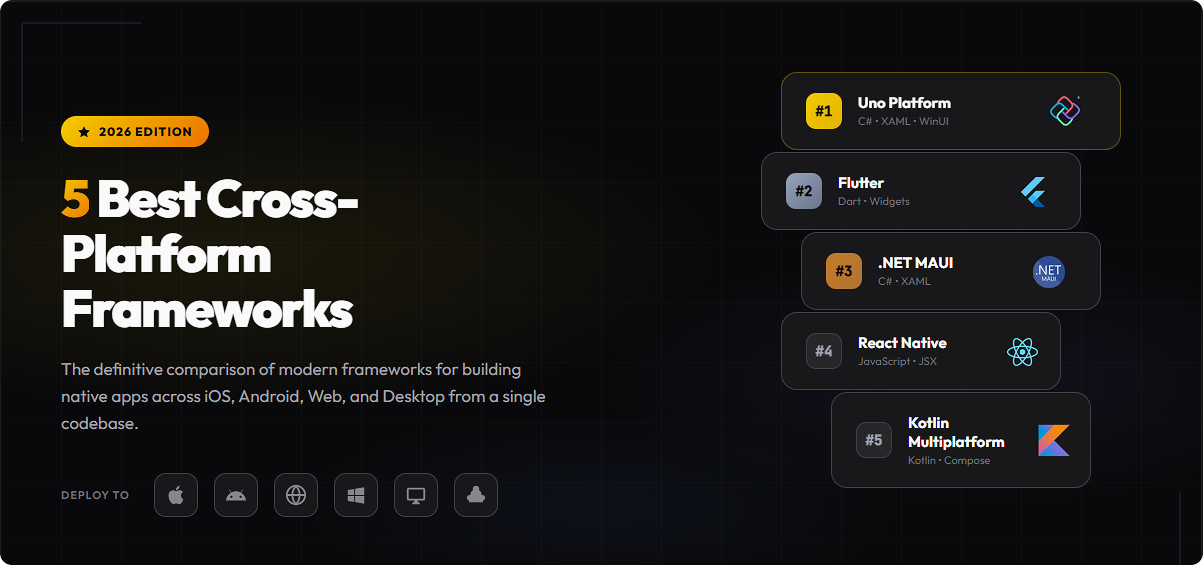
The frameworks we will evaluate:
- Flutter – The market leader with 46% mobile developer adoption
- React Native – The JavaScript ecosystem champion
- .NET MAUI – Microsoft’s enterprise-focused solution
- Uno Platform – The comprehensive 6-platform solution
- Kotlin Multiplatform – The native UI flexibility option
How We Evaluated These Frameworks
Before diving into each framework, here are the criteria that matter most when selecting a cross-platform solution:
Platform Coverage
- Mobile: iOS, Android support and minimum versions
- Desktop: Windows, macOS, Linux native support
- Web: Browser-based deployment capability (especially WebAssembly)
Developer Experience
- Hot reload capabilities for rapid iteration
- Visual design tools availability
- IDE support and debugging experience
Ecosystem
- Programming language accessibility
- Community size and package availability
- Third-party library ecosystem
Enterprise Readiness
- Long-term support and roadmap clarity
- Commercial backing and funding model
- Migration paths from existing solutions
1. Flutter - The Market Leader
Flutter has established itself as the dominant force in cross-platform mobile development. Developed by Google and using the Dart programming language, Flutter commands approximately 46% market share among mobile developers in 2026.
Platform Support
According to Flutter’s official documentation, the framework supports:
| Platform | Supported Versions | Notes |
|---|---|---|
| Android | API 24–36 |
Full support |
| iOS | iOS 13–26 |
Full support |
| Windows | Windows 10, 11 |
Desktop stable |
| macOS | 10.15 (Catalina)–26 |
Desktop stable |
| Linux | Debian 10–12, Ubuntu 20.04–24.04 LTS |
Desktop stable |
| Web | Chrome, Firefox, Safari, Edge |
See note below |
Flutter's WebAssembly compilation is limited to Chromium-based browsers (Chrome, Edge). Firefox and Safari fall back to JavaScript compilation, which may impact performance for complex applications.
Key Strengths
Custom Rendering Engine: Flutter uses the Impeller rendering engine (which replaced Skia), providing pixel-perfect consistency across platforms. Companies report significant productivity boosts – some reducing feature development cycles from months to weeks.
Extensive Widget Library: Flutter’s widget-based architecture offers hundreds of customizable UI components out of the box.
Hot Reload: Make changes and see results instantly without losing application state.
Strong Community: The largest cross-platform community means abundant packages, tutorials, and Stack Overflow coverage.
Honest Limitations
- Dart Learning Curve: Dart is not a mainstream language. Teams must invest in learning a language they likely will not use elsewhere.
- WebAssembly Restrictions: Full WebAssembly support only works on Chromium browsers. Firefox and Safari users get JavaScript fallback.
- No Visual Designer: Development is code-only; there is no runtime visual design tool.
Choose Flutter for mobile-first consumer applications, teams willing to adopt Dart, and projects where you need the largest community and package ecosystem.
Notable Apps: eBay Motors, Alibaba, Google Pay, ByteDance apps
2. React Native - The JavaScript Champion
React Native, developed by Meta, brings the React paradigm to mobile development. For teams with JavaScript expertise, it offers a familiar development model with access to the massive NPM ecosystem.
Platform Support
According to React Native’s documentation, platform support is structured as follows:
| Maintenance Model | Platforms |
|---|---|
| Official (Meta-maintained) |
|
| Out-of-Tree (Community/Partner-maintained) |
|
This distinction matters. While iOS and Android receive first-class support from Meta, desktop and web platforms depend on community projects with varying update cycles.
Key Strengths
JavaScript/TypeScript: Access to the largest developer pool. Your React web developers can contribute to mobile development.
Native Components: Unlike Flutter’s custom rendering, React Native uses actual native UI components, providing platform-authentic look and feel.
New Architecture: The Fabric renderer and TurboModules introduced in recent versions significantly improved performance and memory management.
Meta + Microsoft Backing: Strong corporate support ensures long-term viability.
Honest Limitations
- Desktop/Web Not Official: Microsoft maintains Windows/macOS, but these are not Meta’s primary focus.
- No Linux Support: Linux desktop is not available through any maintained project.
- Bridge Overhead: While improved, communication between JavaScript and native code still introduces some overhead.
- Platform Consistency: Because React Native uses native components, UI can differ between platforms.
Choose React Native for teams with existing JavaScript/TypeScript expertise, applications where native platform feel is essential, and projects primarily targeting iOS and Android.
Notable Apps: Microsoft Office, Skype, Xbox Game Pass, Facebook, Discord, Pinterest
3. .NET MAUI - Microsoft's Enterprise Choice
.NET Multi-platform App UI (.NET MAUI) is Microsoft’s evolution of Xamarin.Forms, released in May 2022. It represents Microsoft’s official cross-platform framework for C# developers.
Platform Support
According to Microsoft Learn documentation, .NET MAUI supports:
| Platform | Supported Versions | Notes |
|---|---|---|
| Android | API 24–36 |
Full support |
| iOS | iOS 13–26 |
Full support |
| Windows | Windows 10, 11 |
Desktop stable |
| macOS | 10.15 (Catalina)–26 |
Desktop stable |
| Linux | Debian 10–12, Ubuntu 20.04–24.04 LTS |
Desktop stable |
| Web | Chrome, Firefox, Safari, Edge |
See note below |
This distinction matters. While iOS and Android receive first-class support from Meta, desktop and web platforms depend on community projects with varying update cycles.
Critical Platform Gaps
.NET MAUI does not natively support:
- Linux – No native Linux deployment
- WebAssembly – No browser-based deployment
Future Plans: Microsoft announced a partnership with Avalonia for Linux and WebAssembly support, but as of January 2026, this remains in preview status with limited availability.
Key Strengths
Microsoft Ecosystem: Deep integration with Visual Studio, Azure, and the .NET ecosystem.
C# and .NET: Leverage existing .NET skills and libraries. Access to modern C# language features.
Enterprise Adoption: Growing presence in enterprise environments, particularly among organizations already invested in Microsoft technologies.
Xamarin Migration Path: Clear upgrade path for existing Xamarin.Forms applications.
Honest Limitations
- No Linux Support: Organizations requiring Linux desktop deployment must look elsewhere.
- No WebAssembly: Browser-based deployment is not available natively.
- macOS via Catalyst: macOS support runs iOS apps through Catalyst, not a native macOS experience.
- Single Project Scope: While .NET MAUI has a single project structure, it only spans 4 platforms.
Choose .NET MAUI for Windows-first enterprise applications, teams already invested in .NET and Visual Studio, and projects that do not require Linux or browser-based deployment. .
Notable Apps: Microsoft Office, Skype, Xbox Game Pass, Facebook, Discord, Pinterest
4. Uno Platform - The 6-Platform Solution
Uno Platform stands apart as the only framework offering true 6-platform support from a single codebase and single project. Built on .NET and providing WinUI API compatibility, it fills a unique niche in the cross-platform landscape.
Platform Support
According to Uno Platform’s official documentation:
| Platform | Target Framework | Minimum Version |
|---|---|---|
| WebAssembly | net9.0-browserwasm |
Chrome, Edge, Firefox, Safari |
| Windows | net9.0-desktop or net9.0-windows10.0.19041 |
Windows 7+ (Skia) or Windows 10 (WinAppSDK) |
| Android | net9.0-android |
Android 5 (API 21) |
| iOS | net9.0-ios |
iOS 11 |
| macOS | net9.0-desktop |
macOS 10.15 |
| Linux | net9.0-desktop |
X11 and Framebuffer environments |
For a complete walkthrough of setting up your first Uno Platform project, see the Getting Started guide.
Key Strengths
True Single Project Architecture
According to Why Uno Platform:
“Our Single Project approach is .NET ecosystem’s first and only true Single Project solution, empowering developers with a unified approach, spanning mobile, web, desktop, and embedded apps.”
This is not marketing speak. Uno Platform genuinely provides a single .csproj file that builds for all six platforms. Learn more about migrating to single project structure.
Production-Ready WebAssembly
Unlike .NET MAUI (no WebAssembly) and Flutter (limited browser support), Uno Platform offers production-ready WebAssembly deployment that works across all major browsers including Chrome, Edge, Firefox, and Safari. The WebAssembly support is a core feature, not an afterthought.
Hot Design – Runtime Visual Designer
According to the Hot Design documentation:
“Uno Platform offers Hot Design, industry’s first and only runtime Visual Designer for cross-platform .NET Applications. It transforms your running app into a Designer from any IDE on any OS.”
This is a unique capability. No other cross-platform framework offers a runtime visual designer. Flutter, React Native, .NET MAUI, and Kotlin Multiplatform all require code-only development. Get started with the Hot Design getting started guide.
WinUI API Compatibility
“All controls from WinUI, Windows Community Toolkit, or open-source projects developed for WinUI 2/3 or UWP will work with Uno Platform.”
This means existing WinUI skills transfer directly, and the extensive Windows Community Toolkit library is available cross-platform.
Rendering Flexibility
Uno Platform offers two rendering approaches:
- Native rendering: Uses platform-native UI primitives on iOS, Android, and WebAssembly
- Skia rendering: Provides pixel-perfect consistency across all platforms
Learn about the Skia rendering engine and when to use each approach.
Additional Capabilities
- .NET MAUI Embedding: Incorporate .NET MAUI controls from third-party vendors (Syncfusion, Telerik, DevExpress, etc.). See the MAUI Embedding documentation.
- Open Source: Free under Apache 2.0 license with a sustainable funding model
- Xamarin Migration: Proven migration path for Xamarin.Forms applications
- Hot Reload: Comprehensive Hot Reload support across all platforms
Honest Limitations
- Smaller Community: Compared to Flutter and React Native, the community is smaller with fewer third-party packages.
- C#/.NET Required: Teams without .NET experience face a learning curve.
- Less Mainstream Awareness: Not as widely known as Google-backed Flutter or Meta-backed React Native.
- Hot Design Availability: Hot Design requires an Uno Platform account (free registration).
Choose Uno Platform when you need maximum platform coverage including production WebAssembly, Linux desktop, or embedded scenarios. Ideal for .NET teams wanting a single codebase across all six major platforms, and organizations valuing the productivity of a runtime visual designer. .
Explore best practices for developing Uno Platform applications to maximize your productivity.
Notable Apps: NPE, TradeZero, Kahua, Hug, Sentry
5. Kotlin Multiplatform - The Native UI Approach
Kotlin Multiplatform (KMP), developed by JetBrains with Google’s backing, takes a fundamentally different approach. Rather than sharing UI code, it focuses on sharing business logic while allowing native UI per platform.
Platform Support
According to Kotlin Multiplatform documentation:
| Platform | Status | Notes |
|---|---|---|
| Android | Stable | First-class support |
| iOS | Stable | Via Kotlin/Native |
| Windows | Stable | Desktop support |
| macOS | Stable | Desktop support |
| Linux | Stable | Desktop support |
| Web | Beta | Via Kotlin/Wasm (Sept 2025) |
| Server | Stable | JVM target |
Compose Multiplatform: JetBrains also offers Compose Multiplatform for teams wanting shared UI. As of May 2025, iOS support reached stable status with version 1.8.0.
Key Strengths
Flexibility: Share business logic while keeping platform-native UI. This appeals to teams wanting native experiences without duplicating core logic.
Compose Multiplatform Option: Teams can choose shared UI via Compose Multiplatform if desired.
Google’s Endorsement: Google officially recommends Kotlin Multiplatform for sharing code between Android and iOS.
Enterprise Adoption: Growing list of enterprise adopters including Google, Duolingo, Forbes, Philips, McDonald’s, Bolt, and H&M.
Honest Limitations
- Web Still Beta: Kotlin/Wasm reached Beta in September 2025. Production web deployments should be carefully evaluated.
- Kotlin Requirement: Teams must know or learn Kotlin.
- Smaller Community: While growing, community size trails Flutter and React Native.
- No Visual Designer: Development is code-only.
Choose Kotlin Multiplatform for Android-first projects, teams wanting native UI per platform with shared business logic, or organizations seeking gradual cross-platform adoption. .
Notable Adopters: Google, Duolingo, Forbes, McDonald’s, Philips, Baidu
Framework Comparison Table
| Criteria | Flutter | React Native | .NET MAUI | Uno Platform | Kotlin MP |
|---|---|---|---|---|---|
| Language | Dart | JavaScript/TypeScript | C# | C# | Kotlin |
| iOS | Yes | Yes | Yes | Yes | Yes |
| Android | Yes | Yes | Yes | Yes | Yes |
| WebAssembly | Limited (Chromium only) | Community | No | Yes (all browsers) | Beta |
| Windows | Yes | Community | Yes | Yes | Yes |
| macOS | Yes | Community | Catalyst | Yes | Yes |
| Linux | Yes | No | No | Yes | Yes |
| Total Platforms | 6 (with caveats) | 2–4 (varies) | 4 | 6 | 5–6 (web beta) |
| Visual Designer | No | No | VS Only | Hot Design | No |
| Open Source | Yes | Yes | Yes | Yes (Apache 2.0) | Yes |
| Primary Backer | Meta | Microsoft | Uno Platform | JetBrains/Google | |
| Community Size | Largest | Very Large | Large (.NET) | Growing | Growing |
When to Choose Each Framework
Choose React Native when:
- You have existing JavaScript/TypeScript expertise
- Native platform look and feel is essential
- iOS and Android are your primary targets
- You want to leverage the massive NPM ecosystem
- Desktop support is not a requirement
Choose .NET MAUI when:
- Your organization is heavily invested in .NET and Visual Studio
- Windows is a primary deployment target
- You do not need Linux or browser-based deployment
- You are migrating from Xamarin.Forms
- Enterprise Microsoft ecosystem integration matters
Choose Uno Platform when:
- You need production-ready WebAssembly that works in all browsers
- Linux desktop or embedded scenarios are requirements
- You want the productivity boost of a runtime visual designer
- You are a .NET team wanting maximum platform reach with a single project
- WinUI API compatibility and Windows Community Toolkit access are valuable
- You want the option to embed .NET MAUI controls
Choose Kotlin Multiplatform when:
- Android is your primary platform
- You want native UI per platform with shared business logic
- Your team knows Kotlin or is ready to learn
- You prefer flexibility over prescribed UI patterns
- Gradual cross-platform adoption suits your roadmap
Frequently Asked Questions
Impeller
and
Skia
respectively), while React Native and Kotlin Multiplatform leverage native components. For most apps, the differences are negligible—benchmark your specific use cases if performance is critical.
Syncfusion,
Telerik,
and
DevExpress.
Kotlin Multiplatform is designed to coexist with native code. Mixing frameworks adds complexity, so it’s best done intentionally and sparingly.
.NET MAUI or
ON THIS PAGE
Start Building
Ready to build cross-platform apps with Uno Platform? Get started with our quickstart guide.
Get Started Subscribe to Our Blog
Where Uno Devs Get Their News
Get the latest release news, tutorials, blogs, Uno Tech Bites, and more—straight to your inbox.
No spam—just practical, developer-focused content delivered occasionally.
 Subscribe via RSS
 Back to Top
TAGS
Related Posts
Privacy Overview
Uno Platform 5.2 LIVE Webinar – Today at 3 PM EST – Watch